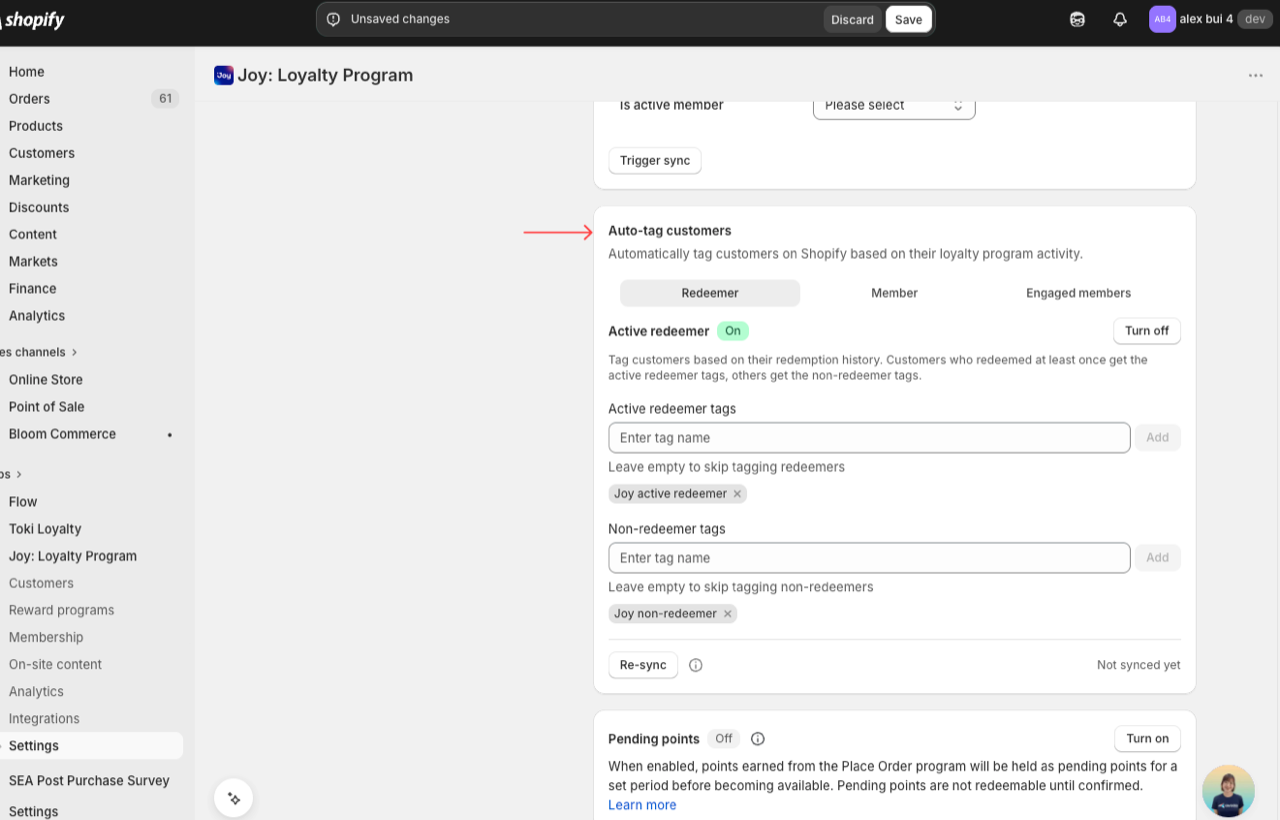
Auto-tag customers
Tag customers in Shopify based on loyalty membership, redemption history, or storefront engagement — then segment, target, and report on them.
This feature is available for All plans.
What it does
Joy writes native Shopify customer tags automatically when your customers' loyalty behavior changes. Three independent tagging types, all in one card under Settings → Additional features. Tags sync instantly to Klaviyo, Shopify Flow, Shopify Analytics, and any tool connected to your Shopify store.
| Tagging type | Who gets tagged |
|---|---|
| Active redeemer | Customers who have redeemed at least one reward (vs. never redeemed) |
| Member / Non-member | Customers who joined the loyalty program (vs. guests or left) |
| Engaged members | Customers who clicked a Loyalty button on storefront (Join, Sign up, Sign in) |
How to set up
Open the card
Go to Settings → Additional features → Auto-tag customers.
Turn on the tagging you need
Each tagging type has its own toggle. Flip the ones you need — the tag name fields become editable.
Enter your tag names
Type a tag name and press Enter. Add multiple tags if needed. Leave any field blank to skip that side (e.g., tag redeemers without tagging non-redeemers).
Save
Click Save in the top bar. Joy starts tagging from this moment forward on every matching customer event.
Re-sync existing customers (optional)
Click Re-sync to apply tags to every existing customer based on their current status. Recommended the first time you turn on redeemer or member tagging.
Migration note for existing stores
Member tagging is off by default for stores that already have Joy installed. Your previously applied joy_tag_member tags stay on customers — Joy does not remove them automatically. Set your preferred tag names, save, then run Re-sync to standardize every customer.
How Re-sync works
Re-sync recalculates every customer from scratch — not incremental. Joy pulls every customer, checks their current loyalty status, removes outdated Joy tags, and applies the correct tag.
Run Re-sync when:
- You turn on redeemer or member tagging for the first time
- You change a tag name and want existing customers updated
- You import customers from another loyalty platform
Engagement tagging has no Re-sync — engagement is a live click event, not a stored status.
Where these tags show up
Because Joy writes native Shopify customer tags, every Shopify-connected tool recognizes them automatically:
- Klaviyo — segment by
Shopify Tag = your tag name - Shopify Flow — use
Customer tagsas a condition - Shopify Analytics — segment reports by tag. See Joy data in Shopify Analytics
- Customers list — filter by tag inside Shopify admin
FAQs
Do I have to fill in both tag fields?
No. Each field is optional. Tag only the side you care about.
Will turning on member tagging delete my old joy_tag_member tags?
No. Old tags stay until you run Re-sync, which replaces them with your new tag names.
Does engagement tagging tag past customers?
No. Engagement is a live event. Use redeemer or member tagging with Re-sync for historical tagging.
Can I use these tags in Shopify Flow?
Yes. All three tagging types write native Shopify customer tags — a first-class condition in Shopify Flow.