Manage customers' types
Manage customer types in Joy Loyalty. Understand Members, Guests, and Left Program, plus how SSO and legacy accounts affect earning and redemption.
This feature is available for All plans.
Overview
Customer types determine who can earn points, who can redeem rewards, and who can see their loyalty status. Joy translates how customers authenticate into three clear types so the loyalty experience stays consistent regardless of how they shop.
- Members can earn points, redeem rewards, and see their full loyalty status inside the widget.
- Guests may earn points if allowed, but they cannot redeem or view their loyalty balance until they register.
- Left-program customers are fully excluded and do not see the loyalty widget at all.
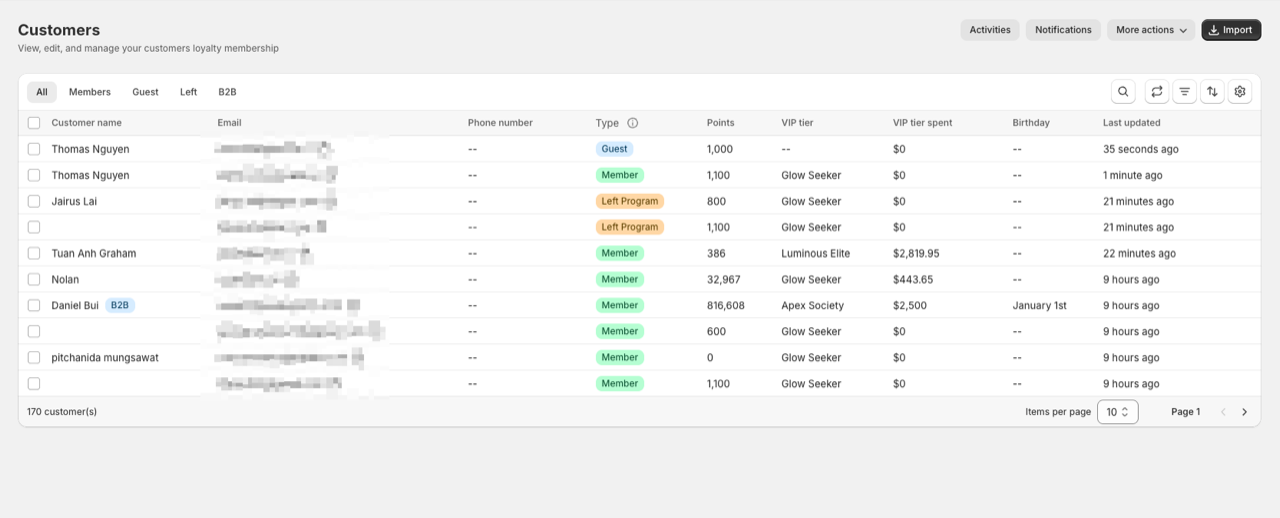
The three customer types
Member
A Member is a fully eligible customer who can earn points, redeem rewards, join VIP tiers, and see their loyalty status inside the widget. Members have access to the complete loyalty experience.
How someone becomes a Member depends on your Shopify account system, which Joy automatically detects. You can also set all customers as Guest by default and manually assign who can join the program.
Guest
A Guest is a customer who is not recognized as a Member. They may earn points if guest earning is enabled, but they cannot redeem rewards or view their loyalty data until they become Members. The widget only displays general program information to them.
Left program
Customers in this type are completely excluded from the loyalty program. They cannot earn points, cannot redeem, and cannot view the loyalty widget at all. Stores often use this type for wholesale users, internal staff, test accounts, or any customers who should be excluded from rewards.
SSO vs legacy accounts: how customers become Members
Joy follows Shopify's authentication rules to determine the customer type.
If your store uses Shopify's SSO (New Customer Accounts)
With SSO, customers authenticate using Shopify's identity system instead of creating a traditional store account. Once authenticated:
- Joy always treats them as a Member
- They do not need to register a store account
- Their loyalty status appears instantly
- They can earn and redeem seamlessly
With SSO, customers are Members anytime Shopify identifies them.
If your store uses legacy customer accounts
Legacy accounts require customers to manually create a store account and log in.
Under this system:
- A customer becomes a Member only after creating an account
- If they are not logged in, they are treated as Guest
- Guests cannot redeem or see loyalty status
- Once logged in, they regain Member status
With legacy accounts, customers are Members only when they register and log in.
| Feature / Behavior | SSO (New Customer Accounts) | Legacy Customer Accounts |
|---|---|---|
| How customer becomes a Member | Automatically, whenever authenticated | Only after registering + logging in |
| Guest behavior | Appears as Guest only if fully unauthenticated | Very common; remains Guest until account created |
| Can earn points | Yes | Yes (or as Guest if enabled) |
| Can redeem points | Yes | Only when logged in |
| Can see loyalty widget | Yes, personalized | Yes, personalized only when logged in |
| Can see loyalty status | Always when authenticated | Only when logged in |
| Experience | Seamless, modern, recommended | Requires manual registration/login |
Manual eligibility mode
Some merchants want full control over who becomes a Member. Joy supports this through the Manually assigned customers only mode.
When this mode is enabled:
- Joy stops auto-assigning Members and Guests
- Customers do not become Members automatically, even if they authenticate or register
- You manually assign who can join the program
- Only assigned Members can earn, redeem, and see loyalty status
This mode is ideal for B2B stores, invite-only loyalty programs, and stores with strict qualification rules.
The Shopify Flow example below shows how you can automate joining or excluding customers. Adapt the trigger and conditions to match your use case.
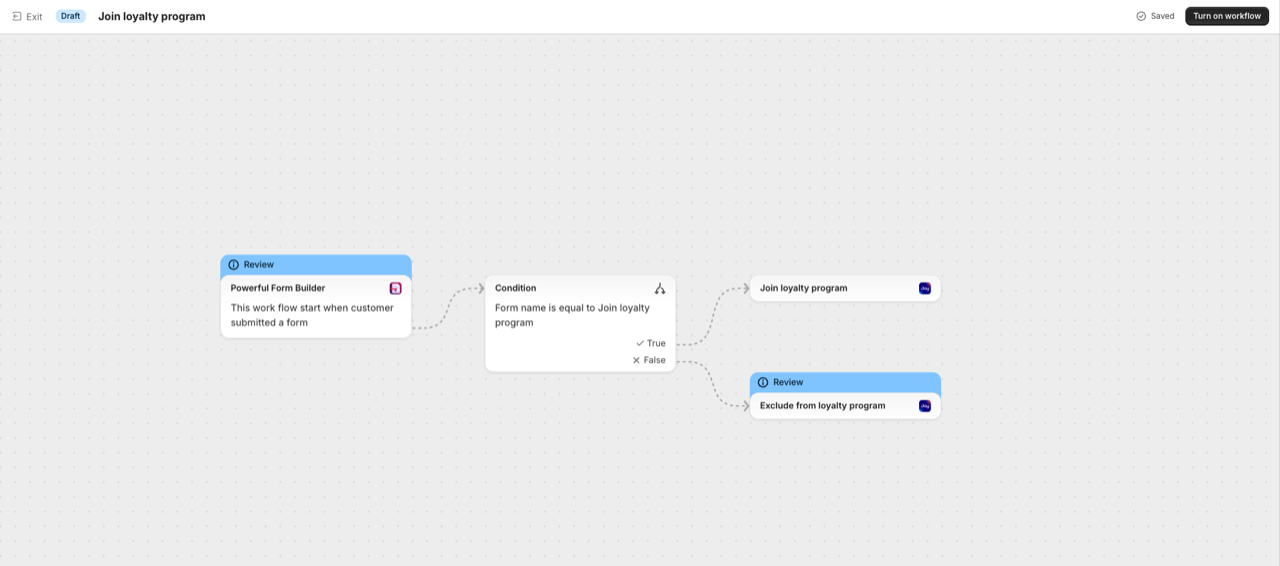
Managing customer types in your Joy dashboard
You can update a customer's type at any time from the Customers section of your Joy dashboard.
Joy enforces logical transitions to keep data consistent:
- A Guest can become a Member or be moved to Left program
- A Member can be changed to Left program
- A Left program customer can be reinstated as a Member
Inside each customer profile, shortcuts such as Join program and Exclude from program make adjustments quick and simple.
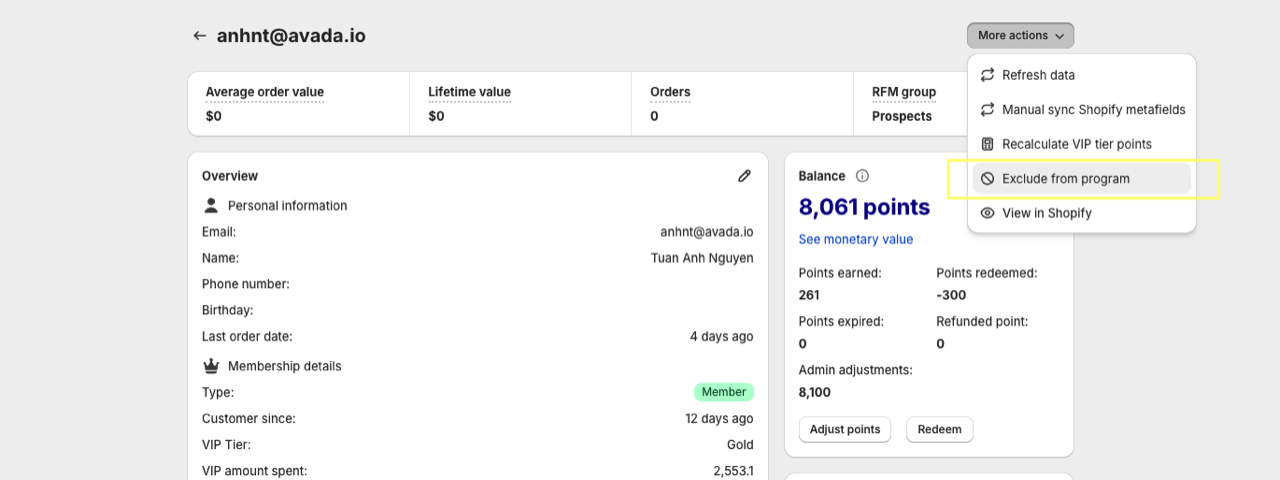
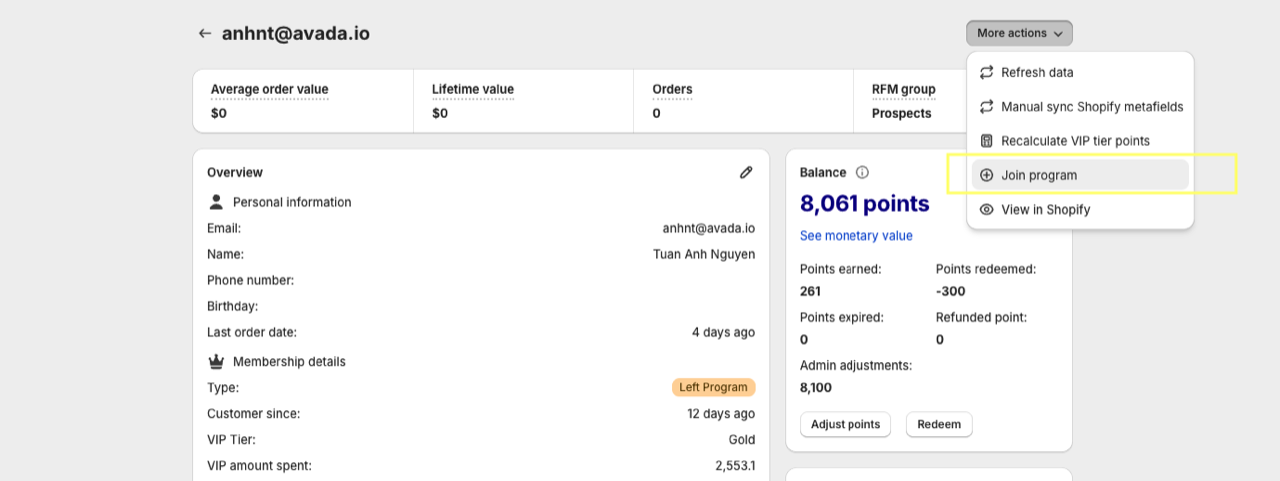
Notes
- A customer marked as Guest can only be changed to Member or Left program.
- A Member can only be changed to Left program.
- A Left program customer can only be changed to Member.
Frequently Asked Questions
What happens to a customer's points when they are moved to Left program?
Their points are preserved but inactive. If they are reinstated as a Member, their previous balance is restored.
Can I bulk-change customer types?
Yes. Use the Customers list view to select multiple customers and apply type changes in bulk. You can also automate this with Shopify Flow.
Does Joy automatically detect which account system my store uses?
Yes. Joy reads your Shopify store configuration and applies the correct membership logic for SSO or legacy accounts automatically.