Member exclusive deal
Set up special offers and exclusive deals for your top-tier customers
This feature is available for: Essential, Advanced and Ultimate plans.
What is "Member exclusive deal" feature?
The Member Exclusive Deal feature is a specialized marketing tool that creates exclusive shopping benefits for loyalty program members directly on your product pages. This feature displays special perks to members while encouraging non-members to join your loyalty program by showcasing the benefits they could unlock.
Why do you need "Member exclusive deal"?
Member Exclusive Deal is a new feature designed to enhance the shopping experience on your product pages. This feature offers special benefits such as Discount Amount, Discount Percentage, Free Shipping, and Bonus Points to all users participating in your loyalty program. For non-members, the Member Exclusive Deal section encourages them to join the loyalty program to unlock these perks.
How to set up "Member exclusive deal"
Get access to "Member exclusive deal"
Navigate to Joy Loyalty dashboard → Membership → Member exclusive deal. You'll see the Exclusive Deals list. Click Add new deal, or click any row to edit. Up to 5 deals per shop.
Set up Deal settings
Basic Information: Set the Rule name (internal, shown in the deals list) and Deal name (shown in the storefront bar). They're separate fields.
Active dates: Choose when the exclusive discount is active.
Static date
Set a fixed Start date and End date for the discount. The discount is active during this specific date range.
Use this for seasonal promotions, flash sales, or events with a known schedule.
Dynamic date
Instead of a fixed date range, you can tie the discount to a recurring date pattern:
| Option | Description |
|---|---|
| Month of birth | Discount is active during the customer's birthday month |
| Weekend | Discount is active every Saturday and Sunday |
| Specific day of month | Discount is active on a chosen day each month (e.g., the 15th) |
| Specific day of week | Discount is active on selected weekdays (e.g., every Monday and Friday) |
Dynamic dates update automatically — no manual changes needed each cycle.
Usage limits: Cap redemptions and track usage in one place:
- Current usage count — a read-only count of successful redemptions at checkout. Click Reload data to refresh.
- Per-customer limit — No limit (default), or cap N redemptions per lifetime, day, week, month, or year.
- Total deal limit — No limit (default), or cap total redemptions across all customers. When the cap is reached, the discount stops applying and a warning appears in the admin — the deal is not turned off automatically.
Customer & item quantity limit: Tier the discount across up to 5 levels — each with a From – To order range, Minimum quantity per cart, and its own Discount value (e.g. orders 1–100: 10% off with 2+ items; 101–300: 15% off with 3+ items). The deal auto-ends past the last level.
Setup deal: Pick the discount type (Discount amount, Discount percentage, Free shipping, or Bonus points), order requirement, and reward amount. New deals start as Draft until you turn them on. Status auto-sets to Scheduled before the start date and Expire after the end date; in between you can toggle Active / Inactive.
Applicable categories: Choose which products are eligible — All orders, Selected products, Selected collections, or All except selected.
When the discount type is Discount amount and you choose anything other than All orders, an Apply once per order toggle appears:
- Off (default) — the discount applies to each eligible unit, so it multiplies by quantity. Example: $5 off with 2 eligible items = $10 off.
- On — the discount applies once per order as long as the cart has at least one eligible item. Example: $5 off total, regardless of quantity.
A helper text under the setting updates live to show exactly how your discount will apply.
Combinations: Configure the combination of discounts
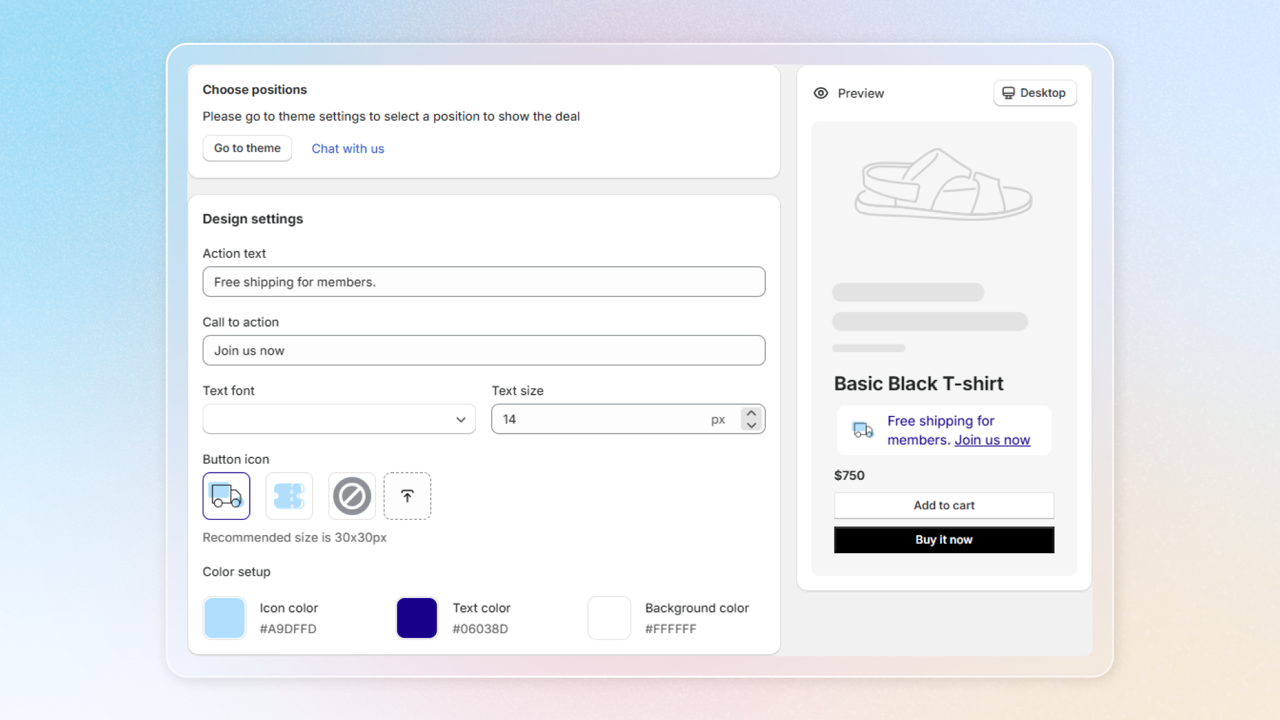
Set up Design
Customize the design settings and preview how the Exclusive Deal bar will appear on your product page with these options:
- Action text
- Call to action
- Text font and size
- Button icon
- Color setup
If you set a total limit, the storefront shows an Available spot progress bar with redemptions left. Per-customer limits and minimum-order amounts also appear as helper text under the CTA.
Activate "Member exclusive deal" bar
Once satisfied with the design, save your changes and select "Go to theme" to activate it.
On the left sidebar, add block on Apps section
Select Joy: Exclusive Deal
Click Save to add "Member exclusive deal" bar to your storefront
Note:
- After you add the Exclusive deal bar to your product page, it will default to the bottom of the page.
- Adjust its position by dragging the Exclusive deal bar card and dropping it into the desired location.