Referrals
Set up and customize referral campaigns with Joy Loyalty
- Basic features are available for All plans
- Advanced features such as Shopify customer tagging, Order tags,... are available for Essential, Advanced and Ultimate plans
What is "Referrals" feature?
The referral program lets customers share your store via social channels using a unique referral link from the loyalty widget. The system tracks referrals automatically, ensuring easy monitoring and rewarding of new customer referrals.
Why do you need "Referrals" feature?
Grow your community with referral campaigns by turning loyal customers into brand advocates. With the Joy Loyalty Program, setting up and managing referrals is easy. This guide will help you launch your first campaign to reward customers and attract new ones.
How to set up "Referrals" feature?
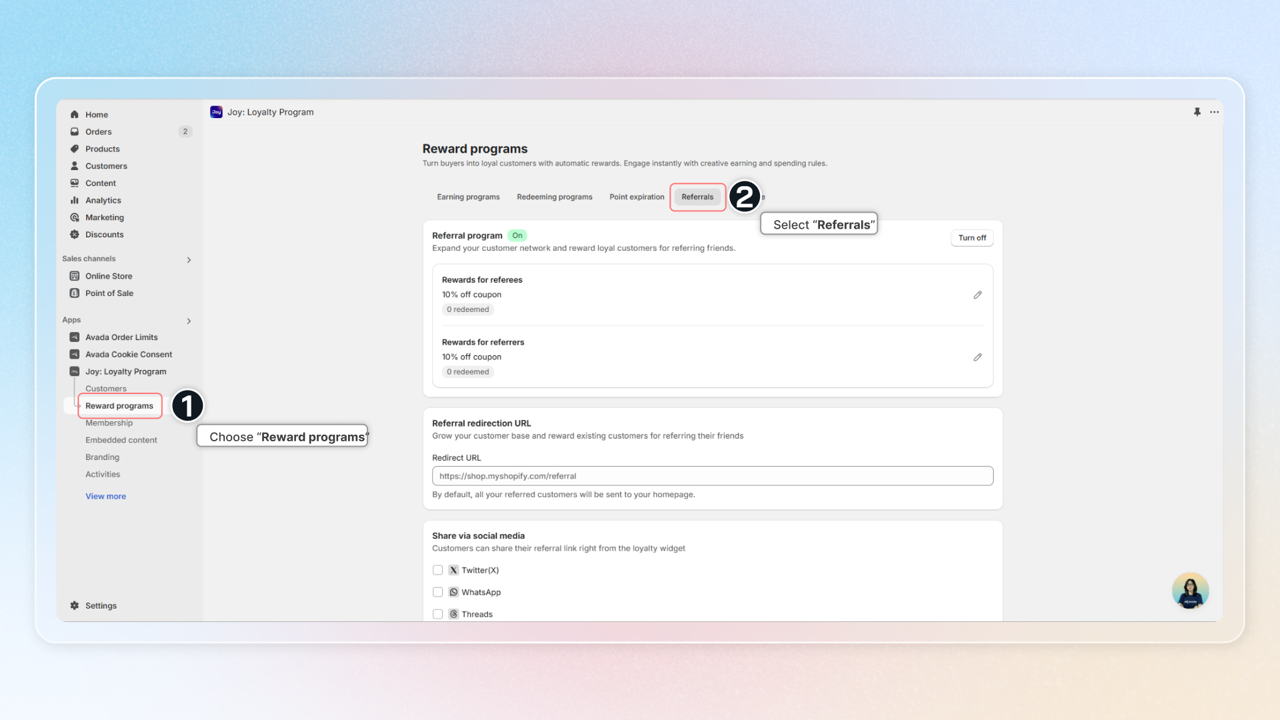
Get access to "Referrals"
Choose Reward programs -> Go to Referrals
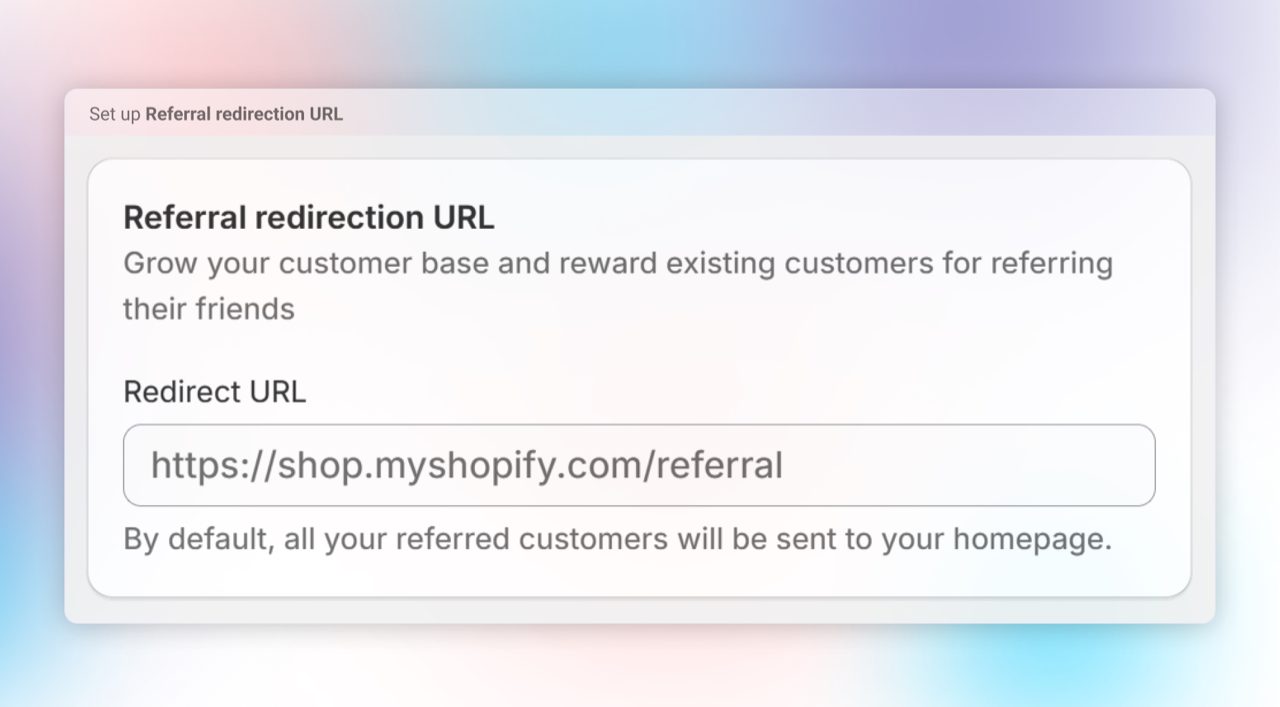
Set up rewards for Referees and Referers
Choose the rewards for both the referrers (customers making the referral) and the referees (new customers).
For Referees:
| Reward type | Description |
|---|---|
| Points | Award loyalty points |
| Store Credit | Award fixed store credit amount |
| Discount percentage | Percentage off their first order (e.g., 10% off) |
| Discount amount | Fixed amount off (e.g., $10 off) |
For Referrers:
| Reward type | Description |
|---|---|
| Points | Award loyalty points per referral |
| Store Credit (Fixed) | Award fixed store credit per successful referral |
| Store Credit (Order-based) | Award store credit based on % of referee's order value |
| Discount percentage | Percentage discount coupon |
| Discount amount | Fixed amount discount coupon |
Tier-based rewards: Customize rewards based on referrer's VIP tier, making the program more attractive to high-value customers.
Percentage discount — Max amount cap: When you choose Discount percentage for either the referee or the referrer, you can enable the Max amount cap to limit how much the discount takes off a single order (e.g. 15% off, up to $30). The cap is configured independently for the referrer and the referee, is off by default, and keeps your program safe from oversized discounts on high-value orders.
When are referral rewards granted? Referral rewards follow your Order status setting. They're granted when the referred order is Paid or Fulfilled — change it under Settings → Order → Reward by order status.
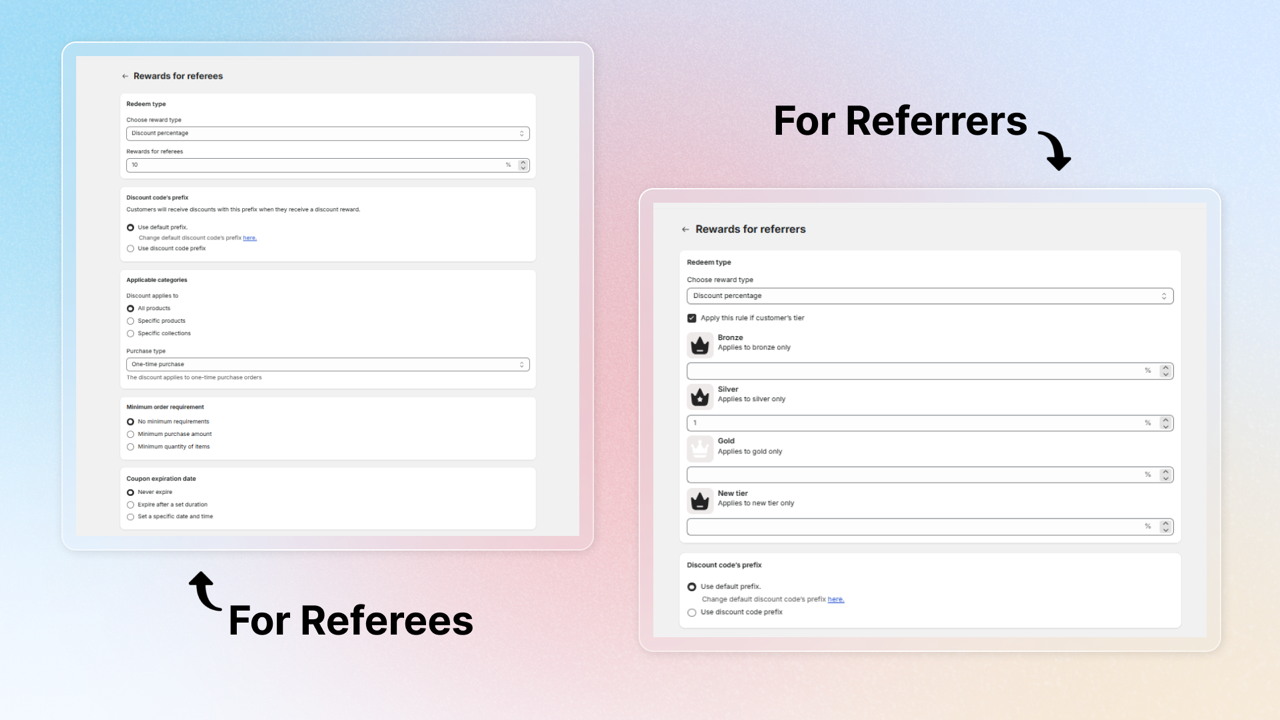
Referral redirection URL
By default, this URL is set to your homepage, but you can modify it to redirect customers to any page you prefer
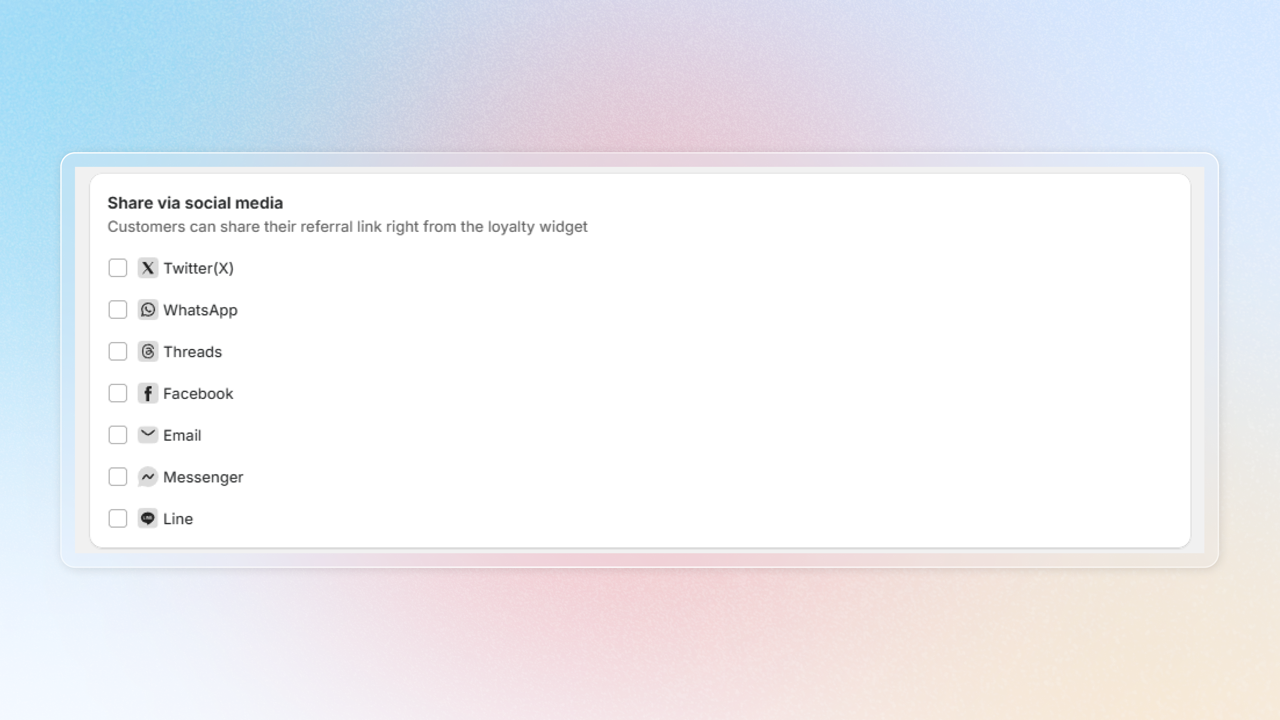
Choose sharing channels
Enable the platforms where your customers can share their referral links. Available channels: Twitter (X), WhatsApp, Threads, Facebook, Email, Messenger, and Line.
For most channels (Twitter, WhatsApp, Threads, Messenger, Line, Email), you can set a custom pre-filled message with the {{shop_name}} variable. Facebook uses the referral link only (no custom message).
When Email is enabled, customers can share their referral link directly via their email client — the referral link is automatically appended to the message you configure.
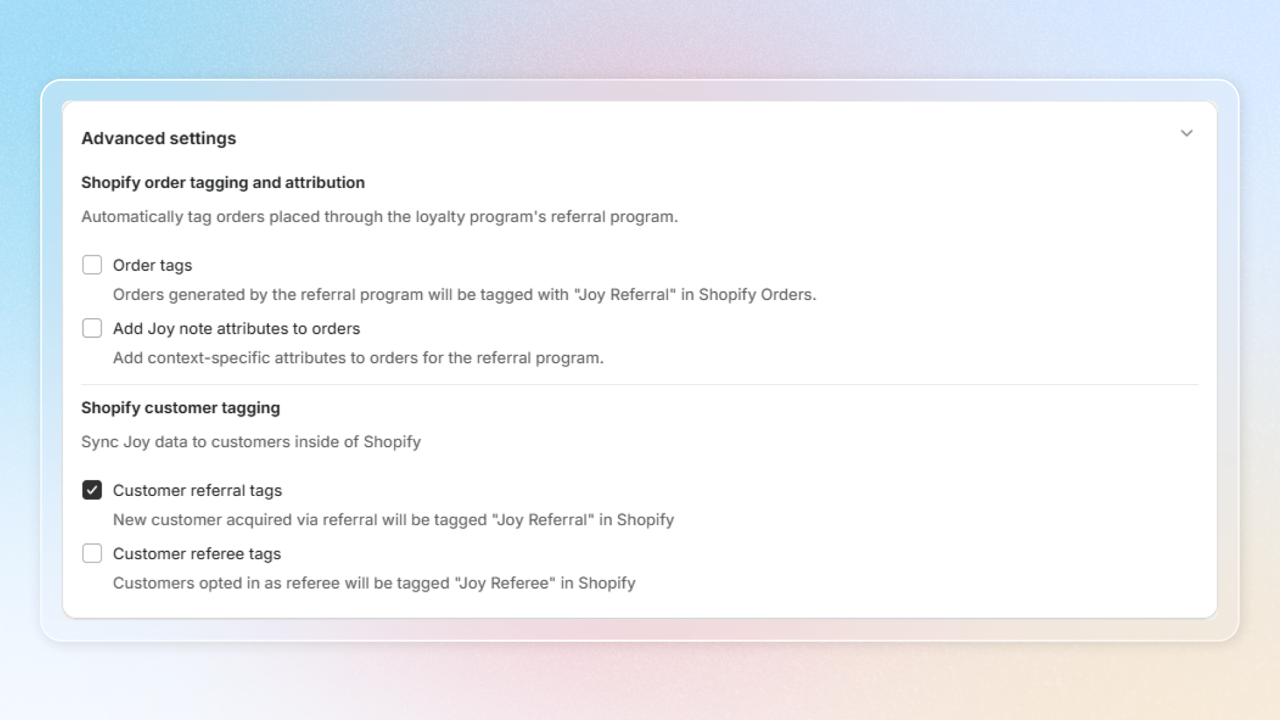
Advanced settings
a. Shopify order tagging and attribution
- Order tags: Automatically adds "Joy Referral" tag to orders from referrals to help you track and measure program success
- Attribution settings: Add detailed context to referral order to help track referral sources
b. Shopify customer tagging
- Customer referral tags: Tag new customers with "Joy referral"
- Customer referee tags: Tag referring customers as "Joy referee"
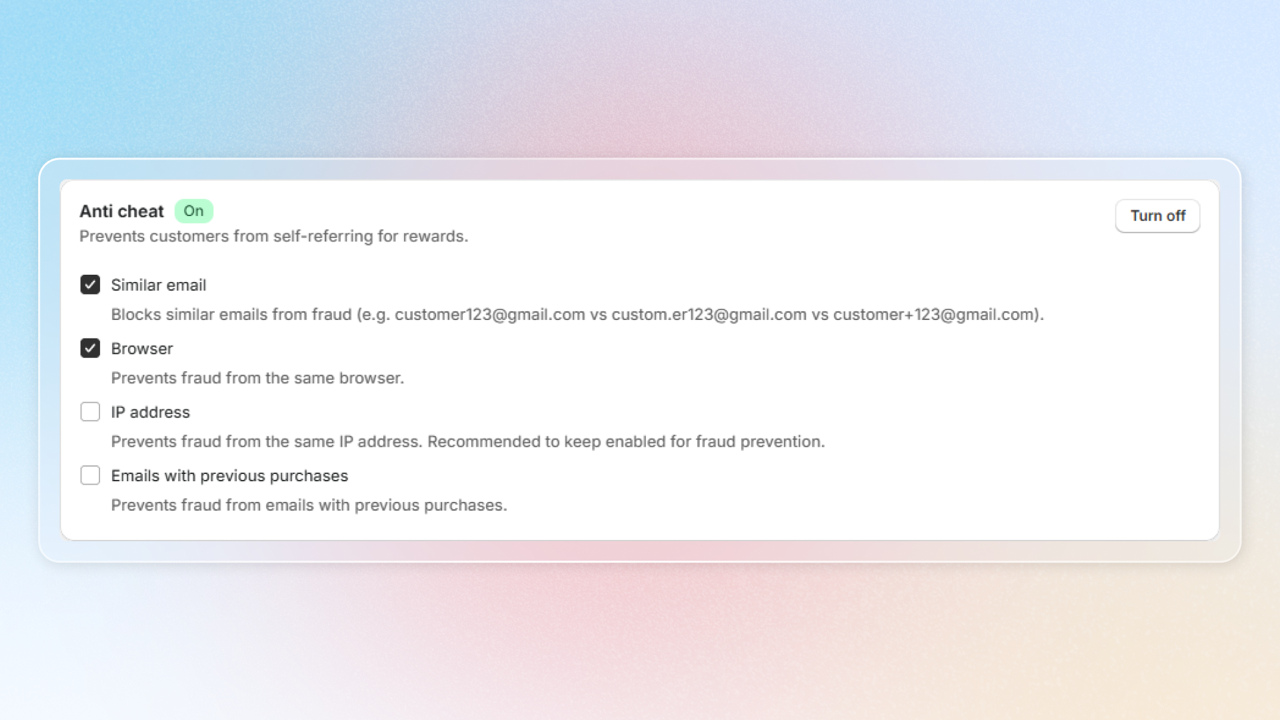
Anti cheat
Enable fraud prevention to keep your referral program fair and secure
- Similar email detection: Block variations of email addresses
- Browser tracking: Prevent multiple referrals from the same browser
- IP address monitoring: Track referrals coming from the same IP address
- Previous purchase history: Check emails against previous purchase records
Save to apply all your changes and hit Turn on to activate your program
Referral rewards by region (multi-currency)
Requires Shopify Markets enabled with at least one non-default market. Available on Essential, Advanced, and Ultimate plans.
If you sell into multiple regions through Shopify Markets, the default reward value (e.g. 200 Kč) gets converted automatically by Shopify for customers paying in another currency — which often produces awkward numbers like 8.24 EUR. Region-based rewards let you set a clean, intentional reward value per region, in that region's currency. The right amount is picked automatically when the referee claims the reward.
How it works
Region-based rewards are off by default. Once enabled, the Rewards card on the Referrals setup page shows a row of region tabs:
- Default — always present, cannot be removed. Used as a fallback when a customer's region isn't configured.
- Additional regions — each tab represents one Shopify market you have enabled (e.g., Vietnam, Czechia, USA). Each tab has its own friend reward and referrer reward.
At claim time, Joy matches the referred customer's region to one of your configured tabs and issues the reward configured for that region. If no match is found, Joy falls back to the Default region's reward.
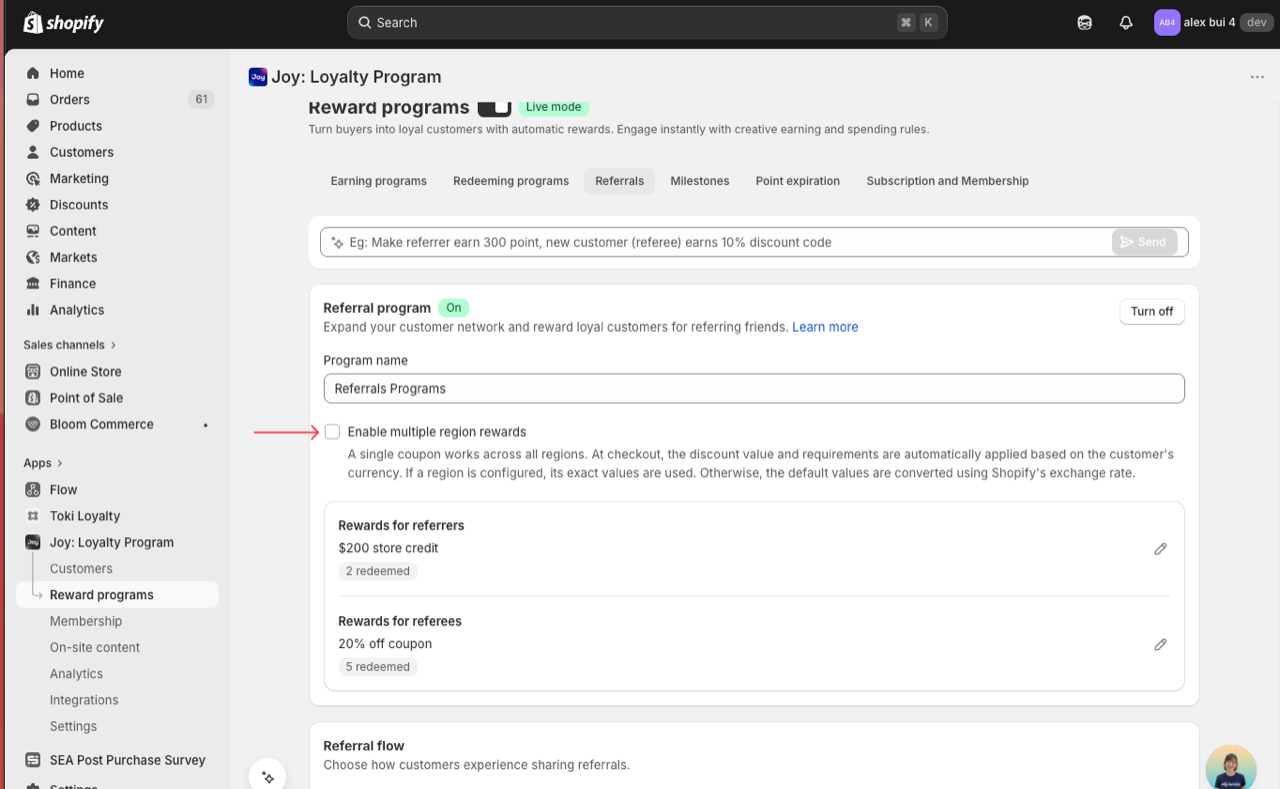
When Enable multiple region rewards is OFF, a single coupon works across all regions — at checkout, the discount value and requirements are automatically applied based on the customer's currency using Shopify's exchange rate conversion. Turn this on only when you want to set exact reward values per region.
Setting up regions
Enable multiple region rewards
On the Referrals setup page, tick the checkbox Enable multiple region rewards under the program name. The region tabs appear on the Rewards card only after this is ticked. Default is OFF.
Add a region
Click Add region on the Rewards card. A modal opens listing the available Shopify markets from your store. Select one or more — regions you have already configured are disabled in the list. Click Add.
If the modal shows "All available regions are added", add a new country inside Shopify first (Shopify admin → Settings → Markets) — new markets become selectable here after they're created.
Configure rewards for the new region
Each region tab has the same reward fields as the default setup — friend reward (Points, Store Credit, Discount percentage, Discount amount) and referrer reward. The currency symbol on the input field auto-updates to match the selected region (e.g. Kč for Czechia, € for EU markets).
Repeat for other regions
Add one tab per market you want a custom reward in. Markets you don't configure automatically use the Default tab's reward.
How claim matching works
When a referee places a qualifying order:
- Joy reads the referee's region / presentment currency from Shopify.
- If the region matches one of your configured tabs → that tab's reward is issued in the region's currency.
- If no configured tab matches → the Default tab's reward is issued.
The coupon issued is region-specific — it applies only in the region it was generated for, so a customer in Czechia can't use a Kč coupon at checkout in EUR.
Referral links match each customer's market
When multiple region rewards is on, Joy also builds each customer's referral link for their own Shopify market — so a friend they refer lands on the right storefront, in the right language and currency, instead of your primary market.
- Joy resolves each customer's market from their address (or storefront region on visit) and generates their referral link with that market's URL — either the matching subfolder (e.g.
yourstore.com/fr/…) or the market's own domain (e.g.yourstore.cz/…) if you use separate domains per market. - It's automatic — no setup beyond turning on multiple region rewards. Existing customers' links regenerate in the background; new customers get the right link from sign-up.
- If a customer's market can't be determined yet, their link falls back to your default referral link until it can.
This fixes a common gap: a single referral link in a newsletter blast used to send every customer to one market. Now each customer's link fits their own.
Check or override a customer's market
Open the customer
Go to Customers and open a customer. In the Membership details section, find the Market row.
Read the market status
{market} (auto)— Joy resolved it from the customer's country.{market} (override)— you set it manually.Default— the customer's country doesn't match any market, so your default referral link is used.
Set it manually (optional)
Click the ✏️ icon to open Set market for this customer. Choose Auto-resolve to let Joy decide, or Override and pick a market under Select region. As the modal notes, "Saving will regenerate the referral link." — the Referrals section on the page refreshes to the new link.
Managing regions
- Remove a region — the tab disappears and customers in that market fall back to the Default reward.
- Duplicate protection — the Add region modal blocks adding a market you've already configured.
- Editing a live region — changes apply to future claims only; coupons already issued keep their original value.
Tips
- Start by adding your top 3 markets — you don't have to configure every Shopify market. Unconfigured markets simply use the Default.
- Use round numbers that feel native to each market —
200 Kč,15 €,$15all read clearly; converted equivalents (8.24 €) don't. - Keep the combined reward value roughly equivalent across regions for fairness — a noticeably better reward in one market invites abuse via VPN.
Why referrals work
Referrals are the highest-trust acquisition channel available to any ecommerce brand. A recommendation from a friend removes the biggest barrier to purchase — doubt.
- Referred customers convert 30% more than traffic from paid ads (Nielsen)
- Referral programs generate 2× the sales of paid advertising at a fraction of the cost (McKinsey)
- Referred customers have higher LTV — they already come pre-qualified by someone who knows your brand
The mechanics are simple: your existing customer puts their personal credibility behind your product. The reward is compensation for that advocacy — not a bribe, but a thank-you that makes sharing feel worthwhile.
The double-sided structure is key. Giving a reward to both referrer and referee removes friction on both ends. The referrer feels generous (not mercenary), and the referee has a real reason to act on the recommendation now.
How to set reward amounts
A useful rule of thumb: the combined value of both rewards should not exceed your average first-order gross margin, while still feeling meaningful to both parties.
| Variable | What to consider |
|---|---|
| Your AOV | Higher AOV = you can afford a larger fixed reward |
| Your margin | Don't give away more than you can absorb on acquisition |
| Your CAC | If you spend $30 on ads to acquire a customer, a $15 referral reward is a great trade |
| Perceived value | A $10 reward feels significant for a $30 order; trivial for a $300 order |
Referrer reward — should feel like meaningful recognition, not an afterthought. Points work well for high-frequency stores; store credit or % discount works well for high-AOV stores.
Referee reward — should lower the barrier to that first purchase. A % discount (e.g. 15% off) typically outperforms a fixed amount for first-time buyers because it scales with their order.
Industry playbooks
Different verticals have different AOV, purchase frequency, and customer psychology. Use these starting points and adjust based on your own data.
Beauty & Skincare
Profile: High repeat purchase, socially driven, recommendations from friends carry enormous weight.
Recommended structure:
| Reward type | Suggested value | |
|---|---|---|
| Referee | % discount on first order | 15–20% off |
| Referrer | Points | 300–500 pts (≈$5–10 equivalent) |
Why it works: Beauty customers trust peer recommendations over ads. A generous first-order discount converts referred friends immediately. Points keep the referrer engaged in the broader loyalty program.
Tips:
- Promote via post-purchase email and loyalty widget
- Highlight the referee reward in sharing copy: "Give your friend 15% off"
- Tie tier-based bonuses for Gold/Platinum referrers to amplify top customers
Fashion & Apparel
Profile: Style-conscious, community-oriented, moderate-to-high AOV, seasonal purchase cadence.
Recommended structure:
| Reward type | Suggested value | |
|---|---|---|
| Referee | % discount on first order | 10–15% off |
| Referrer | Store credit (fixed) | $10–15 store credit |
Why it works: Store credit feels more premium than points for fashion buyers — it signals real value. A % discount scales with the size of the referee's first order, making it attractive across price points.
Tips:
- Launch referral campaigns around new collection drops or peak seasons (BFCM)
- Feature UGC ("my friend got me into this brand") in referral email copy
- Consider a short reward validity window (30–60 days) to drive urgency
Health & Supplements
Profile: Subscription-prone, high LTV, purchase driven by results and trusted advice.
Recommended structure:
| Reward type | Suggested value | |
|---|---|---|
| Referee | % discount on first order | 15% off |
| Referrer | Store credit (order-based %) | 10–15% of referee's order value |
Why it works: Order-based store credit aligns the referrer's incentive with the referee's spend — the more the friend buys, the better the reward. This naturally encourages referrers to share with genuinely interested contacts.
Tips:
- Highlight results and transformation in referral copy, not just the reward
- Referral flows pair well with subscription upsells for the referee
- Enable browser tracking and IP monitoring to prevent abuse from deal-seekers
Home & Lifestyle
Profile: Lower purchase frequency, higher AOV, considered purchases, strong word-of-mouth influence.
Recommended structure:
| Reward type | Suggested value | |
|---|---|---|
| Referee | Fixed discount amount | $15–25 off first order |
| Referrer | Fixed discount amount | $15–20 off next order |
Why it works: With infrequent purchases and high AOV, fixed amounts feel more tangible than percentages or points. The referee gets a clear, compelling reason to try; the referrer gets a reason to come back sooner.
Tips:
- Referral copy should lead with the product story, not just the discount
- Keep the reward validity window generous (90 days) — purchase cycles are long
- Promote via post-delivery email when customer satisfaction is highest
Pet Products
Profile: Highly emotional, strong community, recurring needs (food, treats, accessories).
Recommended structure:
| Reward type | Suggested value | |
|---|---|---|
| Referee | % discount on first order | 15% off |
| Referrer | Points | 400–600 pts |
Why it works: Pet owners bond over their animals and love sharing finds with other pet parents. Points accumulate well for repeat buyers (food, supplements). A % discount scales nicely across varying basket sizes.
Tips:
- Make the referral widget visible on the loyalty page and post-purchase page
- Referral copy angle: "Your pet-loving friends will thank you"
- Pet-specific events (National Dog Day, etc.) are great moments to push referral campaigns
Baby & Kids
Profile: Trust is paramount, parent communities are highly active, purchase decisions are research-heavy.
Recommended structure:
| Reward type | Suggested value | |
|---|---|---|
| Referee | Fixed discount amount | $10–15 off first order |
| Referrer | Fixed discount amount | $10 off next order |
Why it works: Parents trust other parents above all. A clean, simple double-sided fixed reward is easy to communicate and feels honest. Avoid complex points structures — the value proposition should be instantly clear.
Tips:
-
Keep sharing copy simple and safety/trust-forward, not discount-forward
-
Enable anti-cheat settings — baby product promotions attract coupon abuse
-
Email referral invites perform better than social sharing in this vertical
Best practices
Make the reward visible before the ask. Don't just say "refer a friend" — lead with what both sides get: "Give 15% off, get 500 points." The more specific, the better the conversion.
Promote at the right moment. The best time to ask for a referral is immediately after a positive experience — post-purchase confirmation page, post-delivery email, or after a glowing review submission.
Keep it simple for the referee. The referred friend should land on a page that makes it obvious they're getting a deal and easy to apply it. Avoid sending them to your homepage with no context.
Enable anti-cheat. As your referral program grows, so does abuse. Turn on IP monitoring and browser tracking early — retrofitting anti-fraud after the fact is harder than preventing it from the start.
Review and iterate. Check your referral conversion rate monthly. If referrers share but referees don't convert, increase the referee reward. If nobody shares, increase the referrer reward or promote the program more actively.