VIP Tier Progress block
Show logged-in customers their VIP tier and progress to the next tier right after checkout — the highest-engagement moment to motivate repeat purchase.
This feature is available on Essential plan and above.
What is this feature
The VIP Tier Progress block displays a logged-in customer's current tier, point balance, and progress toward the next tier on your Shopify Thank You page. After checkout, members see how close they are to their next reward and what perks await — turning the post-purchase moment into a motivation to come back.
For non-logged-in customers, the Sign-up block continues to show as before. For logged-in members with an active VIP program, the Tier Progress block takes its place automatically.
Why you should use this feature
The Thank You page is the highest-engagement moment in the customer journey — but until now, it has been blank for logged-in members. Showing "Earn 250 more points to reach Gold" right after they pay creates immediate motivation to return. Members who can see their tier progress are more likely to make a follow-up purchase to unlock the next reward.
What the block displays
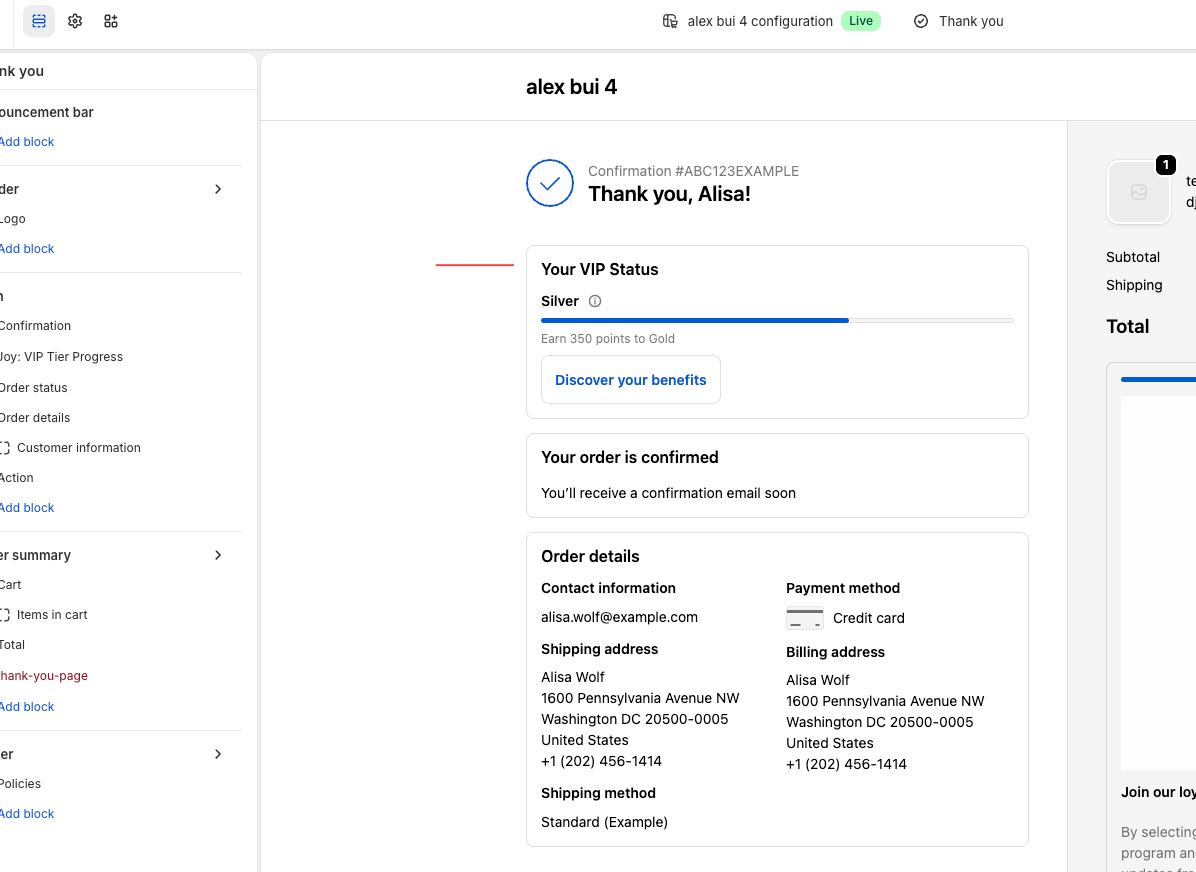
- Current tier: Tier icon and tier name (e.g. Silver Member)
- Progress bar: Visual progress from current tier toward the next
- Progress text: "Earn 250 more points to reach Gold"
- Point balance: Total points the customer currently holds
- Perks preview: Hover the block to see perks of the next tier
If the customer has already reached the highest tier, the block shows a "You've reached our top tier" message instead of the progress bar.
How to set up the VIP Tier Progress block
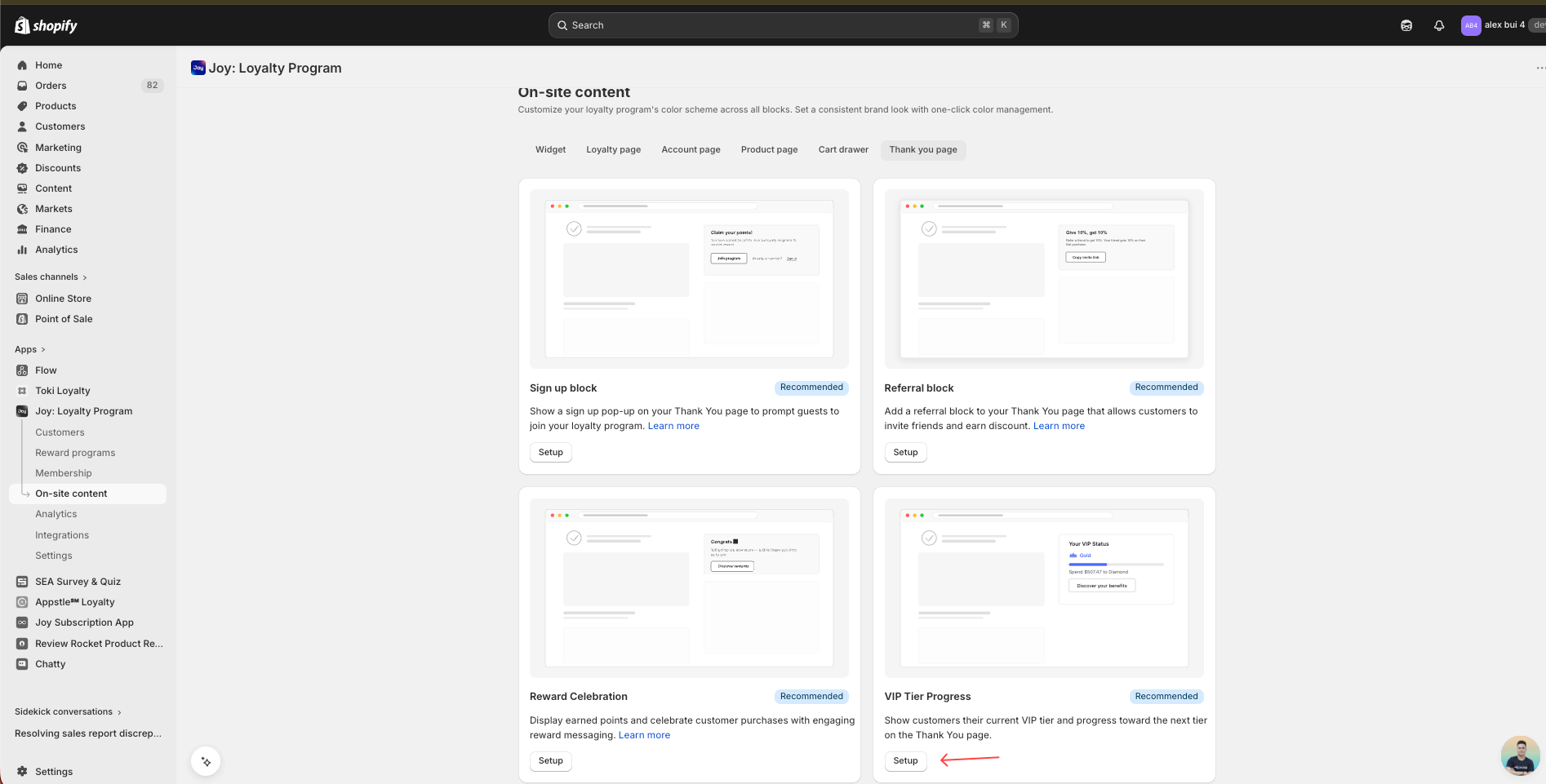
The block is automatically enabled for logged-in customers once you have an active VIP program and the Thank You page widget is installed. No extra setup needed — it shares the same Thank You page widget slot as the Sign-up block.
Make sure VIP Tiers are active
Go to Membership → VIP Tiers and confirm your tiers are published.
Install or check the Thank You page widget
From your Joy dashboard, go to On-site content → Thank you page.
If the Sign-up block is already added to your Thank You page in Shopify, the Tier Progress block will automatically render for logged-in members — no separate install required.
Test with a logged-in customer
Place a test order while logged in as a customer who belongs to a tier. After checkout you should see the tier progress block on the Thank You page.
Edge cases
- Highest tier reached: Progress bar is replaced with a "You've reached our top tier" message.
- No VIP program configured: Block does not render — the Sign-up block continues to show for guests.
- Exclusive tier: Customers in an exclusive (invite-only) tier do not see a progress bar.
FAQs
Q: Does this replace the Sign-up block?
A: No. The Sign-up block continues to show for non-logged-in customers. The Tier Progress block only appears for logged-in customers with an active VIP program.
Q: Do I need to install a separate widget for this block?
A: No. The Tier Progress block uses the same Thank You page widget as the Sign-up block. If your Thank You page widget is already live, this block will render automatically for logged-in members.
Q: What happens if a customer has no points yet?
A: The block still displays — current tier shows as the entry tier, and the progress bar starts from zero toward the first qualifying threshold.
Q: Can I customize the text or colors of the block?
A: The block inherits your widget's brand styling. Progress text uses your translation strings, so you can adjust wording in Branding → Translations.
Q: Does the block work on mobile?
A: Yes. The block is fully responsive and renders the same way on desktop and mobile.
Q: Why don't my customers see this block?
A: Check three things — (1) your VIP program is active, (2) the customer is logged in at checkout, and (3) the Thank You page widget is installed in the Shopify theme editor. If any of these is missing, the block won't render.