Unified Widget — New Storefront UI
The Unified Widget rebuilds every Joy storefront surface on one Lit Web Components codebase — unrestricted theming via design tokens, modular blocks, and zero-risk migration from the legacy widget.
Who can use this feature?
- Available on all plans
- New stores installed after the Unified Widget release date run on it by default — no setup needed.
- Existing stores stay on the legacy widget (V3) until you request the upgrade through our support team.
Overview
The Unified Widget is a complete rebuild of Joy's storefront experience — the floating widget, loyalty page, account page, cart drawer redeem, and points calculator — on Lit Web Components.
Why "Unified"? Until now, each storefront surface was its own piece of code with its own styling rules. The Unified Widget brings all of them onto one codebase, one component library, and one shared design-token system. Style it once and every surface — widget, loyalty page, account page, cart drawer, calculator — stays consistent. No patchwork, no surface that "looks a bit different."
What you get:
- Unrestricted theming — every color, font, radius, and spacing exposed as a CSS custom property. Match your brand pixel-for-pixel without custom CSS battles.
- Modular blocks — 39 reusable components ("Lego-block" architecture). Compose your loyalty page the way you compose a Shopify section.
- Faster, lighter — props-driven components, lazy-loaded chunks, smaller bundle on first paint.
- Zero-risk migration — your existing settings, programs, points, and customers stay untouched. The Unified Widget reuses your current business logic; only the visual layer changes.
Same Joy. Same data. New aesthetic command center.
Before you start
- The Unified Widget is rolled out store-by-store. Your legacy widget keeps running until the Unified Widget is enabled on your store.
- Both versions won't load at the same time — Joy dynamically loads only the one your store has enabled.
- Some legacy-only features stay on the old widget until they migrate (Milestone program UI, interactive website popup, Wallet pass / QR, Submit receipt program, branded reminder popup). Joy auto-falls back to the legacy widget for these flows.
How to get the Unified Widget
New stores
If you installed Joy after the Unified Widget release, you're already on it — no setup needed. Open your loyalty page or storefront widget to see the new design.
Existing stores
If you've been on the legacy widget, request the upgrade through our support team. We'll enable the Unified Widget on your store and your existing branding, programs, points, and customers transfer automatically:
- In-app: open the support chat from your Joy dashboard
- Email: win@joy.so — subject "Enable Unified Widget"
- Help center: help.joy.so → contact form
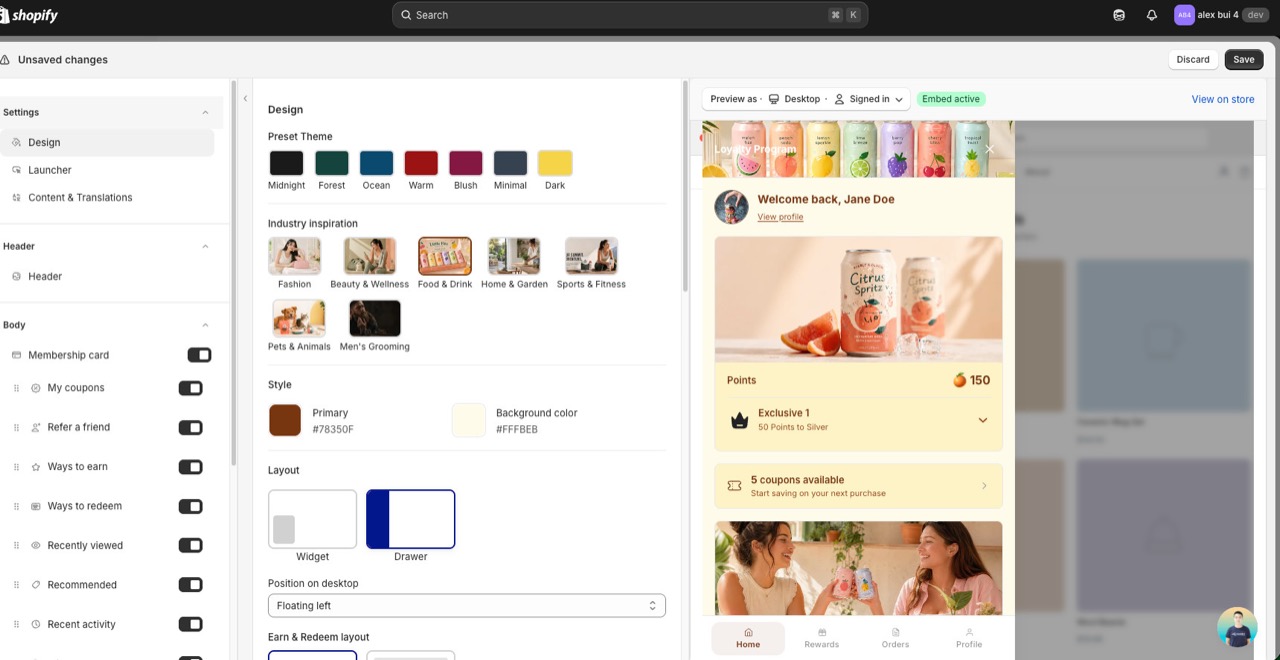
After we enable it, customize the new design in On-site content → Unified widget using the design token editor:
- Colors — primary, secondary, surface, on-surface, accent (with auto-contrast pairs)
- Typography — font family, size scale, weight, letter-spacing
- Shape — border radius scale (button, card, modal)
- Spacing — padding/gap scale across all blocks
- Custom CSS — still supported, now scoped via CSS custom properties
Want to roll back?
Reach out to support the same way and we'll switch your store back to the legacy widget.
Customize the Unified Widget
Open On-site content → Unified widget to fine-tune the new surface. Recent additions:
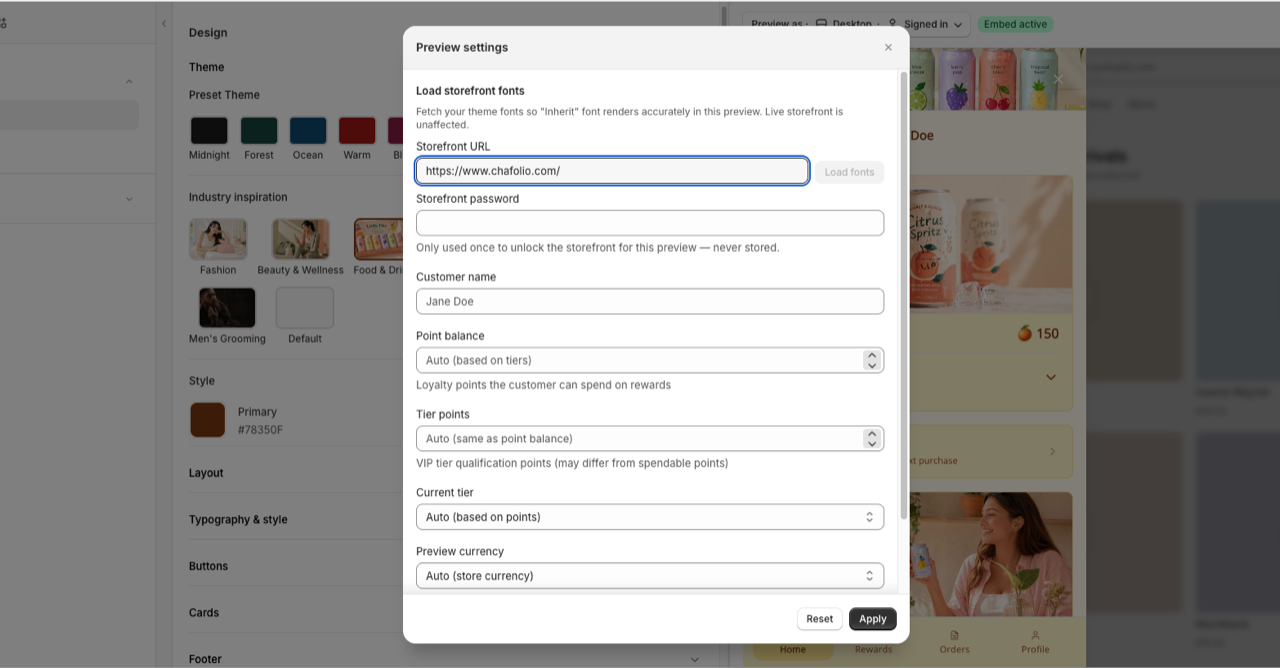
Preview with your storefront fonts
In the editor's Preview settings, enter your Storefront URL and click Load fonts so the "Inherit" font renders accurately while you design. If your storefront is password-protected, add the Storefront password (used once for this preview, never stored). Your live storefront is unaffected.
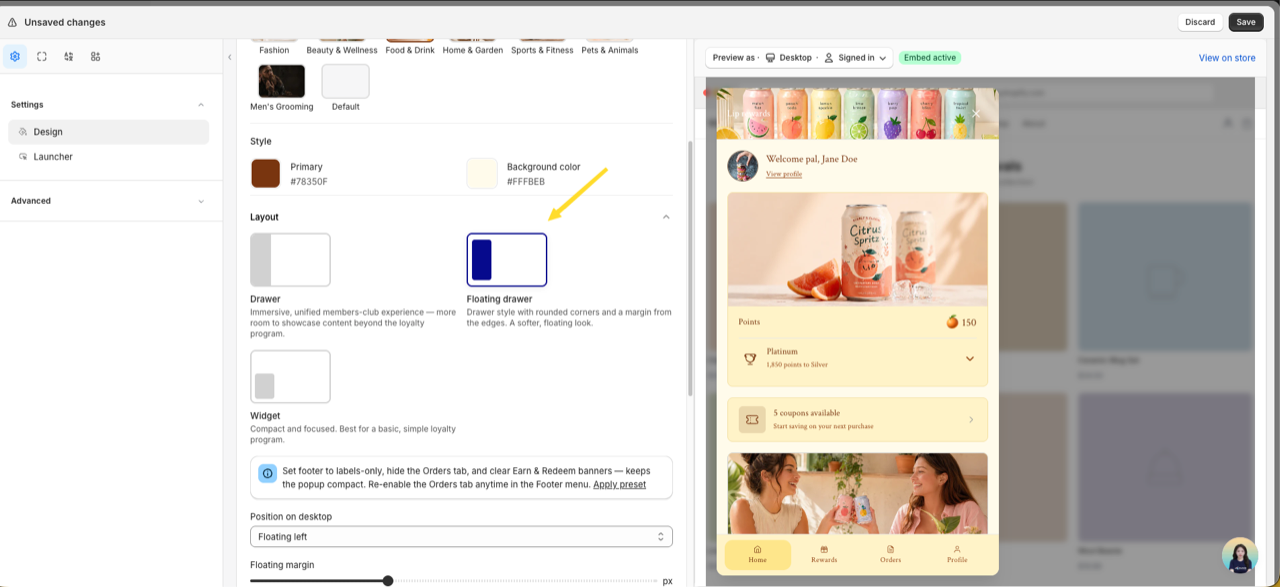
Floating drawer layout
Under Design → Layout, pick Floating drawer — a drawer with rounded corners and a margin from the screen edges for a softer, floating look. Set the Floating margin (8–32px). On mobile it still stacks into a bottom sheet like the standard drawer.
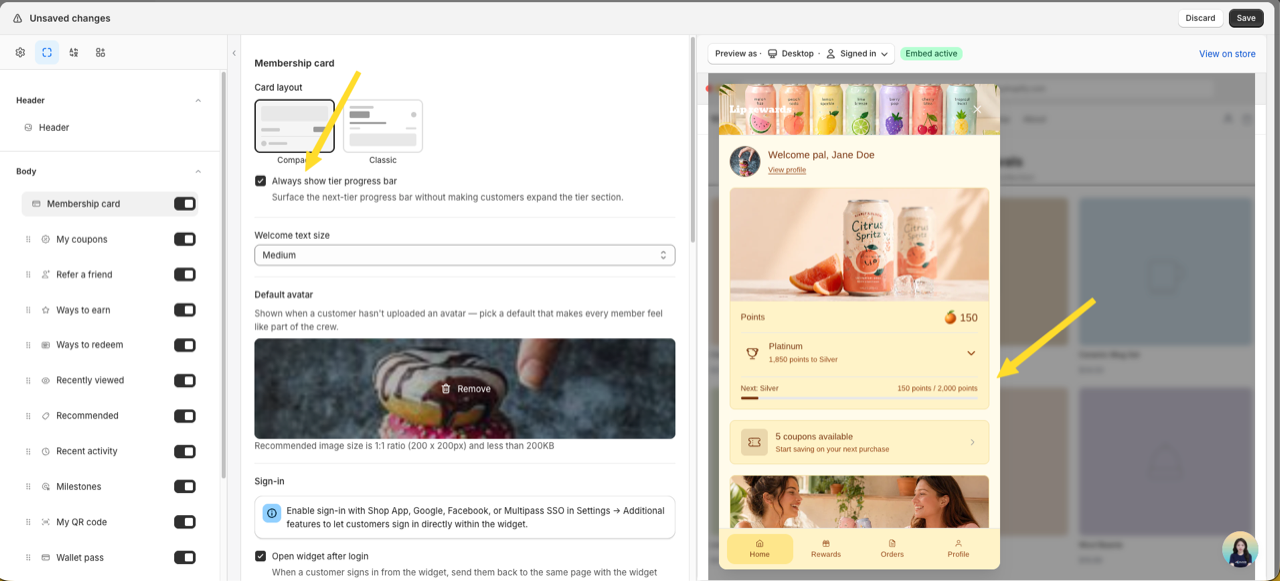
Always show the tier progress bar
In Membership card settings, turn on Always show tier progress bar to surface the next-tier progress bar without customers expanding the tier section. Works for both Compact and Classic card layouts.
More editor improvements
- Welcome greeting variables — use
{customer_name},{customer_firstname}, or{customer_lastname}in the Welcome back greeting. Specific-name variables override the "Customer name display" setting. - Per-program detail image — give each earning/redeeming program a separate hero image for its detail view, on top of the small list icon.
- Recommended cold-start fallback — choose which browsing signal personalizes recommendations (Personalize from) and a Fallback collection shown when no signal matches.
- Province / State field — the address form now collects province, state, or prefecture (e.g. Japan), so saving an address no longer clears it.
- Page transition — animate view changes with None, Slide, or Fade (Design → Layout).
What changes for your customers
| Surface | Legacy widget (V3) | Unified Widget |
|---|---|---|
| Floating widget (FAB + drawer/popup) | Preact, fixed layout | Web Component, customizable layout |
| Loyalty landing page | Single template | 10 modular blocks (Hero, How it Works, Ways to Earn, Ways to Redeem, VIP, Referral, Activity, FAQs, etc.) |
| Account page | Plain HTML | 4 dedicated blocks (points, tier, activity, redeem) |
| Cart drawer redeem | Static button | <joy-redeem-cart> web component, theme-aware |
| Points calculator | Inline DOM | <joy-points-calculator> web component, variant-aware |
Frequently asked questions
Will this break my current widget?
No. Your legacy widget keeps running until our team enables the Unified Widget on your store.
Do I need to redo my branding settings?
No. Your current colors, fonts, and button styles auto-map to the Unified Widget's design tokens when it's enabled. You can fine-tune from there.
What happens to features not yet migrated?
Milestone program UI, interactive website popup, Wallet pass / QR, Submit receipt program, and branded reminder popup remain on the legacy widget. Joy auto-falls back when the customer hits one of those flows — no broken UI.
Can I roll back?
Yes. Contact support and we'll switch your store back to the legacy widget.
Does the Unified Widget affect Shopify Flow, Klaviyo, or other integrations?
No. It only changes the storefront view layer. All triggers, events, API endpoints, and webhook payloads remain identical.
When will the remaining features migrate?
Tracked on the Roadmap. Subscribe to the changelog to get notified.
Need help?
Reach out at win@joy.so with your store URL and "Unified Widget" in the subject — we'll handle enable, rollback, and any setup questions.