Instagram comment rewards
This feature is available for the Advanced and Ultimate plans
Overview
Reward customers with points for commenting on your Instagram posts. This program helps you:
- Boost organic engagement on your Instagram content
- Increase post reach through comment activity (Instagram algorithm favors engaging posts)
- Build community by encouraging customers to interact with your brand
- Collect UGC signals from real customer feedback
When to use this
- Launching new products → drive conversation
- Running giveaways → increase participation
- Building brand awareness → grow your Instagram presence
- Promoting seasonal campaigns → boost visibility
Requirement: Instagram Business or Creator account required.
Step 1: Connect Instagram
Before setting up the program, connect your Instagram account first.
Go to Integrations → Instagram
Reward customers for linking their account
In Integrations → Instagram, open the Reward for Linking Instagram Account card, turn it on, and set the Points value to reward customers the first time they link their Instagram username — across all three Instagram programs (Comment, Story Mention, Story Reply).
- One-time reward — earned only on the first link. Updating the username later doesn't award points again.
- Each program page shows a read-only banner with the current reward, so you set it once here.
- When off, nothing changes for customers.
Step 2: Create the Program & Comment to earn rewards
Go to Reward programs → Earning programs → Add program → Social activity
Select Comment on Instagram (Recommend) from the event dropdown.
Available Settings
You can customize how this program works to fit your specific campaign needs. Here is a breakdown of the key settings you can configure:
| Section | Options |
|---|---|
| Program info | Rule name, Description, Start/End date |
| Reward method | All members / Member by tier, Points value |
| Post selection | All posts / Specific posts only |
| Keyword filtering | Include keywords, Exclude keywords |
| Auto engagement | Automatic public reply (Single / Random from list / AI-generated), DM notification |
| Anti-cheat | Earning limit (once lifetime / X times per period / unlimited) |
Automatic Public Reply — when enabled, Joy posts a public reply under the customer's comment after they earn points. Turn on Enable automatic reply to comments, then choose a Reply mode:
| Reply mode | How it works |
|---|---|
| Single message | Replies with the same message every time. |
| Random from list | Randomly picks one message from your list for each reply — feels more natural and avoids a spammy, repetitive look. Add at least 2 messages. |
| AI-generated reply | Uses AI (GPT-4o) to generate a natural, contextual reply based on the comment. Set a Maximum reply length (50–500 characters) and a Fallback message used when AI can't generate a reply. |
All reply messages support the {points} (points earned) and {customer_name} variables. If you manage messaging through Shopify Flow (the "Reply to Instagram Comment" action), the built-in auto-reply is disabled and Shopify Flow handles replies instead.
Customer Experience
1. Find the program: Customer opens the Loyalty Widget or Rewards Page and sees the "Comment on Instagram" program under Ways to Earn.
2. Link Instagram account: Customer clicks the program and enters their Instagram Username to participate. If the linking reward is enabled, they earn the bonus points instantly the first time — and see a confirmation toast.
3. Visit your Instagram: Customer clicks the link to open your Instagram profile directly.
4. Leave a comment: Customer comments on your post (must match any keyword filters if set)
5. Earn points:
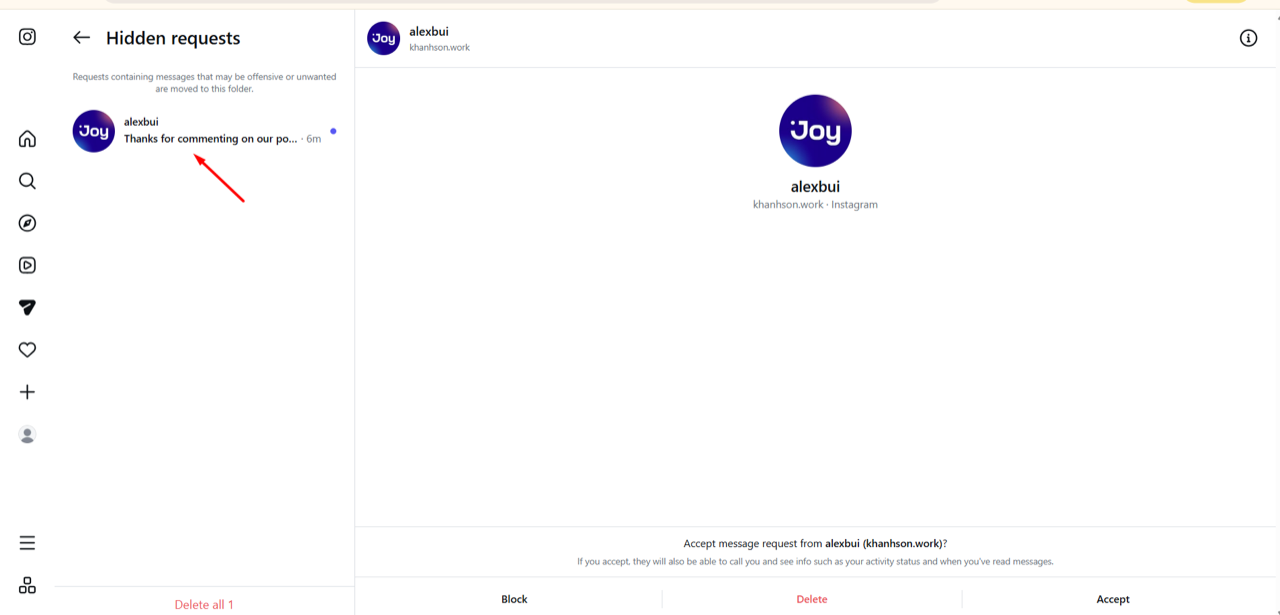
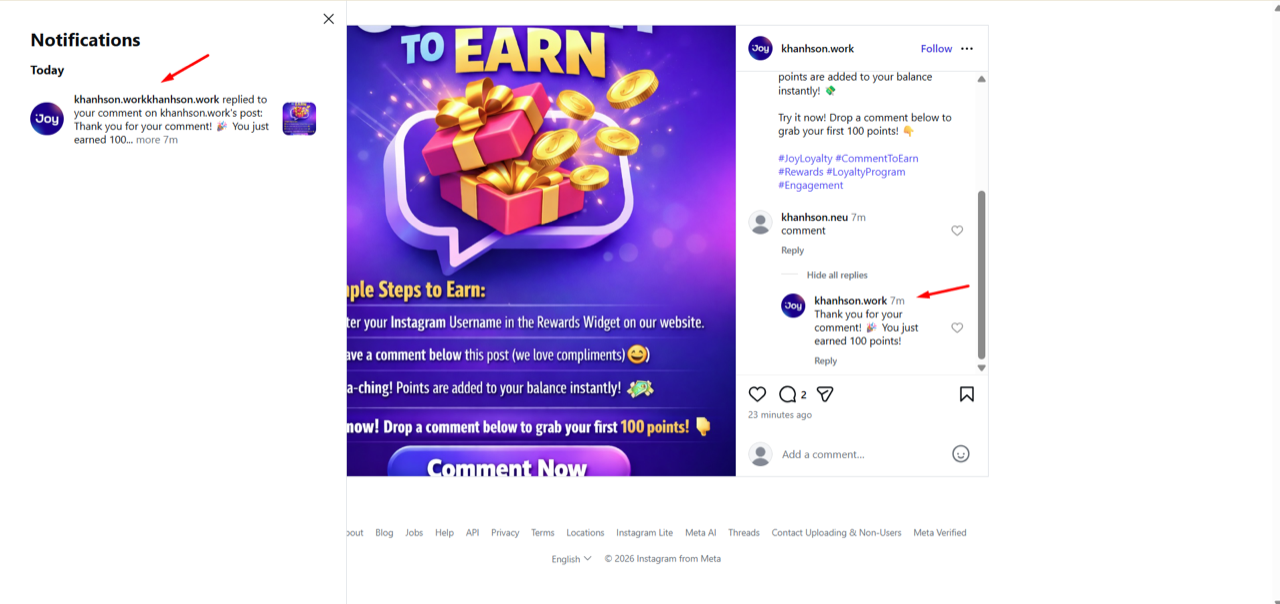
Points are awarded automatically. Customer sees:
- Auto-reply on their comment — a fixed message, a random pick from your reply list, or an AI-generated response, depending on your setup (if enabled)
- DM notification in Instagram inbox (if enabled)
- Points added to their loyalty balance
FAQ
Why can't I see Comment on Instagram option? Choose Social activity first, then select "Comment on Instagram" from the event dropdown.
Can customers earn multiple times? Yes. Adjust or disable the limit in Anti-cheat settings.
Why isn't a customer receiving points?
- Instagram username not entered
- Integration disconnected
- Comment blocked by keyword filter
- Post not in selected list (if using Specific posts)
Personal Instagram account work? No. Must be Business or Creator account.
Are there other programs like Instagram Story Mention or platforms like Facebook? Yes — Instagram Story Mention, Story Reply, and Live Comment rewards are already available, and we keep adding more social actions (such as Reddit and Facebook). More platforms are on our roadmap.