Discount Combination
Allow customers to stack discounts with loyalty rewards at checkout
This feature is available for: Essential, Advanced and Ultimate plans.
How Discount combinations work
Allow customers to stack eligible discounts for the best total discount, combining both automatic discounts and discount codes.
Each discount that you create belongs to one of the following categories, depending on what the discount applies to:
- Order discount
- Product discount
- Shipping discount
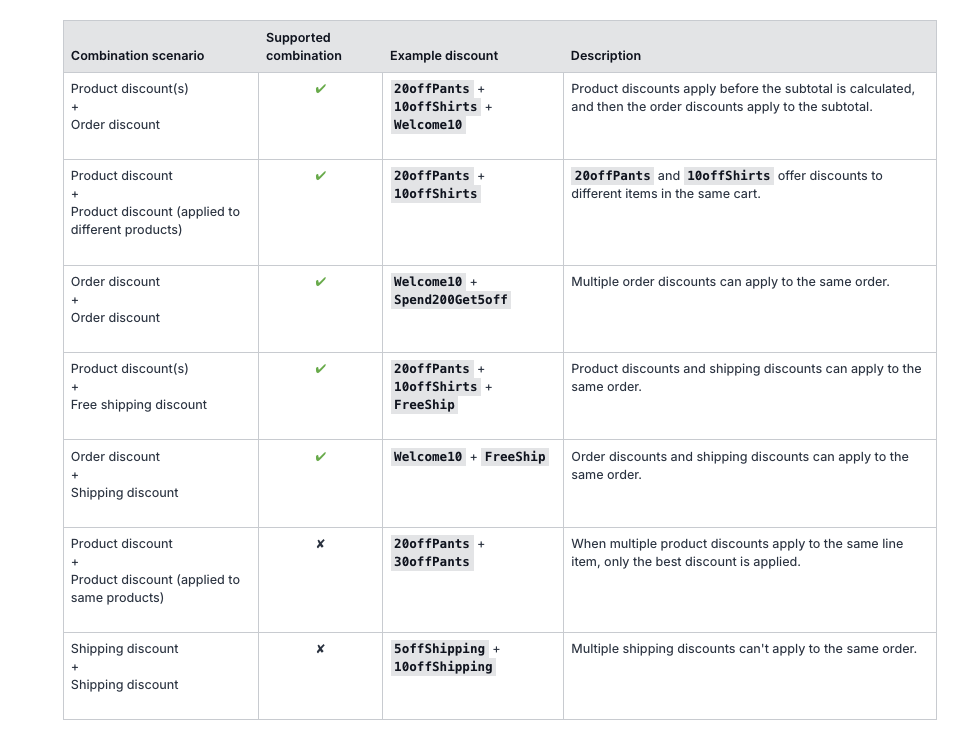
You can choose which discount categories combine. For example, a 10% order discount code can be combined with product discount codes.
If a customer enters more than one discount code during checkout that can't be combined, they'll see this message: "Discount couldn't be used with your existing discounts."
How to set up Discount Combination
Go to Redeem Programs
Select 'Rewards program' from the navigation menu. Click on 'Redeem Programs’
Add any discount method
Choose discount combination methods
Discount combination limit
Only 1 discount per product
If your customer applies 2 product discounts on the same product, Shopify will automatically select the most beneficial discount for your customer.
Only 1 shipping discount per order
Please note that your customers can only apply one shipping discount per order. This ensures fair use and maintains the integrity of your discount system.
I changed the Discount combination setting. Will it affect a previously redeemed discount?
No, it will not. It can only be applied to the newly redeemed discount after the setting change.