Loyalty Dashboard Block
A comprehensive guide to implementing and customizing the enhanced Loyalty Dashboard block on your account page.
Looking for the full loyalty experience? The Loyalty Hub is the recommended way to embed loyalty into your Shopify customer account — it brings points, rewards, VIP, referrals, and wallet passes into one dedicated page. The Loyalty Dashboard Block is a lighter option for stores that prefer a single embedded widget.
This feature is available in Advanced, Ultimate
What is a Loyalty Dashboard?
A Loyalty Dashboard is a centralized section on a customer's account page that displays their complete loyalty program status. It shows their current points balance, tier level, available rewards, earning history, and progress toward the next tier or reward. This dashboard serves as the customer's personal command center for all loyalty-related information.
Why do you need this feature?
The enhanced dashboard with discount values transforms how customers perceive and interact with your loyalty program. By showing specific discount amounts (like "50% off" or "$20 off") instead of just program descriptions, customers can immediately understand the real monetary value of their rewards.
This transparency increases program engagement by helping customers make strategic decisions about when and how to redeem their points. When customers see concrete savings opportunities, they're more motivated to participate actively in your loyalty program and make additional purchases to reach higher-value rewards.
Loyalty dashboard display rules
Block settings/Progress
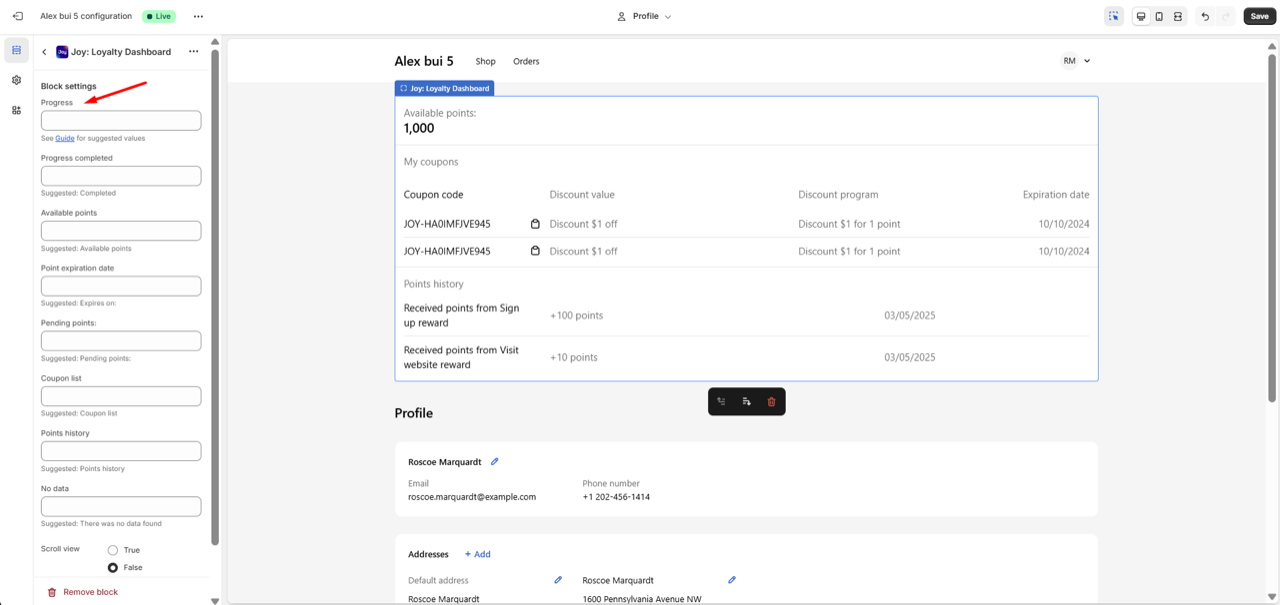
For the "Progress" field in the Block settings. We suggest using dynamic variables based on your VIP tier calculation method
| Tier calculation method | Suggested value | Examples |
|---|---|---|
| by Point | Earn {{remaining_points}} {loyalty_point}} to {{next_rank}} | Earn 150 points to Gold |
| by Spent amount | Spend {{remaining_spend}} to {{next_rank}} | Spend $220 to Silver |
| by Order amount | Place {{remaining_orders}} {{loyalty_orders}} to {{next_rank}} | Place 5 orders to Gold |
Note: The table above is for reference only. After you select your Tier calculation method, our app will automatically update the Progress field value for you.
Discount Value Column
The dashboard now displays a dedicated "Discount Value" column showing:
| Reward Type | Discount Value Display | Example |
|---|---|---|
| Percentage discounts | Shows percentage with "off" | "50% off", "20% off" |
| Fixed amount discounts | Shows dollar amount with "off" | "$30 off", "$10 off" |
| Free shipping | Displayed as "-" | "-" (with clear program description) |
| Free gifts | Displayed as "-" | "-" (with program details) |
| Buy X Get Y offers | Displayed as "-" | "-" (value varies by cart contents) |
Enhanced Program Descriptions
All program descriptions now show proper names and details:
| Program Type | Description Format | Example Display |
|---|---|---|
| Percentage discounts | "Discount X% for Y points" | "Discount 10% for 100 points" |
| Fixed amount | "Discount $X for Y points" | "Discount $10 for 100 points" |
| Dynamic amounts | "Discount $X for every Y points" | "Discount $10 for every 100 points" |
| Buy X Get Y | Shows actual program name set by merchant | "Buy 2, Get 50% off the third item" |
| Free gifts | Shows free gift program name | "Free product" |
| Entry rewards | Shows tier entry reward name | "Gold tier entry reward" |
| Referral rewards | Standard referral text | "Referral program" |
| Milestone rewards | Shows rule name set by merchant | "Earned points milestone" |
How to set up Loyalty Dashboard
Access Embedded Content
- Open the Joy Loyalty app.
- Navigate to Embedded Content from the dashboard.
Click Account page, select Loyalty Dashboard
- Click Edit in Theme Editor
Add the Block to Your Loyalty Page
- Open the Theme Editor
- Select Add Block, then find Joy: loyalty dashboard under the Apps section
Click save
FAQs
Will existing customer coupons automatically show discount values?
Yes, the system automatically calculates and displays discount values for all existing coupons based on their configured reward amounts.
Can I customize the discount value format?
Yes, you can customize the format through the translation settings, including currency symbols and text like "off" or "discount".
What happens if a coupon has multiple discount types?
The system displays the primary discount value. For complex offers like "Buy X Get Y", it shows "-" since the value depends on cart contents.
Can customers see expired coupons in the dashboard?
You can configure whether to show expired coupons. If shown, they typically appear with clear expiration indicators and disabled apply buttons.
Does the enhanced dashboard work with all loyalty program types?
Yes, the dashboard supports all Joy Loyalty program types including percentage discounts, fixed amounts, free gifts, free shipping, referral rewards, and milestone rewards.