Tier Privileges
Set up ongoing rewards for VIP tier members — discounts, free shipping, exclusive products, bonus points, and more
This feature is available for: Advanced, Ultimate.
Overview
Tier Privileges (also known as Perks) are ongoing rewards for customers while they hold a tier. By default they apply automatically to every qualifying order — or you can put a perk on a Perk schedule so it's claimed once per cycle and resets on its own (see below). To give a free gift customers can choose for themselves, see Free product. Unlike Tier Entry Rewards — which fire once when a customer first reaches a tier — Privileges are continuous: the benefit is applied for as long as the customer holds that tier status.
Available privilege types: Discount Amount, Discount Percentage, Free Shipping, Free Product, Bonus Points, Exclusive Products/Collections, and Custom Reward.
You can add multiple privileges to a single tier and stack different types. For example, a Gold tier can have both a 10% discount on accessories and free shipping on all orders — each configured independently.
Tier Privileges vs. Tier Entry Rewards at a glance:
| Tier Privileges | Tier Entry Rewards | |
|---|---|---|
| Frequency | Every qualifying order while in the tier | One-time only when first reaching the tier |
| Purpose | Ongoing retention — reward customers for staying | Immediate gratification for tier achievement |
| Application | Automatic at checkout | Customer redeems a specific reward |
| Duration | Until tier status changes | Expires after single use |
How to set up
Open the tier you want to configure
Go to Membership → VIP Tiers → Tiers, select the tier, then click Add Reward.
Select a privilege type
Under Privileges reward, choose one of the following:
| Type | What it does |
|---|---|
| Discount Amount | Fixed discount auto-applied to qualifying orders |
| Discount Percentage | Percentage discount auto-applied to qualifying orders |
| Free Shipping | Free shipping discount on qualifying orders |
| Free Product | A free product added to each purchase |
| Bonus Points | Extra points awarded each time a successful order is placed |
| Exclusive Products/Collections | Restrict specific products or collections to this tier only — see Exclusive products for VIPs |
| Custom Reward | A custom benefit you define and describe manually |
Configure the reward details
Fill in the fields specific to your chosen type:
- Discount Amount → enter the discount value and currency
- Discount Percentage → set the percentage and minimum order requirement (if any). Turn on Max amount cap to limit how much a percentage discount can take off a single order (for example,
10% off (up to $50)), which keeps your margin safe on large orders. The cap is off by default. - Free Shipping → set a minimum and/or maximum purchase amount, plus shipping restrictions. The maximum lets you cap when the privilege applies — useful when your store already offers free shipping on large orders.
- Free Product → select products eligible as the free gift
- Bonus Points → specify how many bonus points are awarded per order
- Exclusive Products/Collections → select the collections or products to restrict, then set the unlock message shown to non-eligible customers
- Custom Reward → enter a description of the custom benefit
For discount types, set additional conditions where relevant:
- Apply to: all products, specific collections, or specific products
- Minimum order amount: require a minimum spend to activate the discount
- Maximum discount amount: cap the discount value per order
Add more privileges (optional)
Click Add Another Privilege to stack additional perks on the same tier. Each privilege is configured and saved independently.
When you're done, click Save.
Once saved, privileges apply automatically to all future qualifying orders for customers in this tier — no action needed from customers at checkout.
Free product — let customers choose their gift
Free Product perks can let customers pick which gift they want from a list you set (Selection mode), instead of receiving every product automatically. See the dedicated Free product page for full setup and storefront details.
Perk schedule — every order or periodic
Most perks apply to every qualifying order. With Perk schedule you can instead make a perk periodic — claimed once per cycle, then it resets automatically. That unlocks perks like "one free gift per year" or "$10 off, once a quarter." Available on all privilege types except Exclusive Products/Collections.

Open a privilege and find the Perk schedule card
When editing any tier privilege, the Perk schedule card sits just below Setup perks.
Choose when the perk can be used
| Option | What it does (as shown in the app) |
|---|---|
| Always active | Applies to every qualifying order. |
| Periodic | Can be used once per cycle, then resets. |
For Periodic, pick how the cycle resets
- Fixed calendar date — every customer resets on the same date each year. Pick a month and day (e.g. January 1).
- Since last claim — each customer's cycle starts from the date they last used the perk. Pick a cycle length: day, week, month, or year.
Save when you're done.
What customers see on the storefront — a periodic perk shows its current state:
- Available now — ready to claim this cycle.
- Claimed · Available again on Jan 1, 2027 — already used this cycle, with the next reset date.
- Available on Jan 1, 2027 — not yet open for this cycle.
A customer can claim a periodic perk the first time they enter the tier. After that, they wait for the cycle to reset before using it again.
Configuration options
Multiple privileges per tier
You can add multiple privileges of the same type within one tier — for example, two separate Discount Percentage rewards each targeting a different collection. Each discount privilege creates its own automatic discount in Shopify.
- Up to 25 automatic discounts across all tiers (Shopify platform limit)
- Up to 5 privilege rewards combined across all tiers in the current version
Plan your reward structure across tiers to stay within these limits.
Discount combination behavior
When a customer in a tier qualifies for multiple discount privileges on the same order, Shopify applies only the highest-value discount. Other discounts are not stacked.
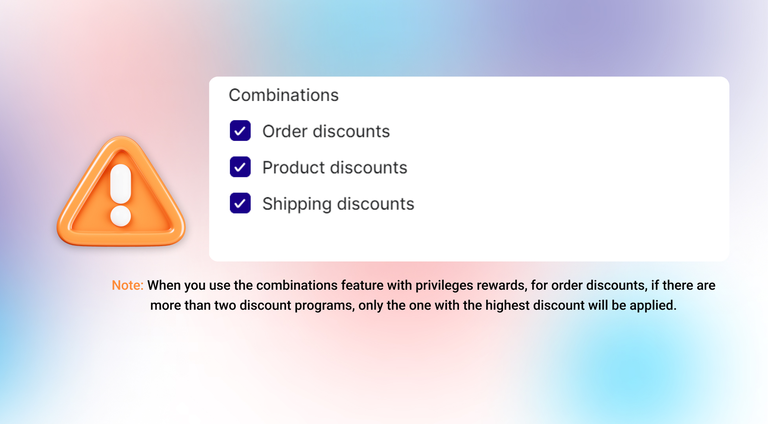
Example: A Gold tier member has a 10% discount privilege and a $10 off privilege, plus free shipping.
- On a $200 order → 10% applies ($20 > $10), plus free shipping
- On a $50 order → $10 off applies ($10 > 10% = $5), plus free shipping
Exclusive Products/Collections
This privilege type restricts specific products or entire collections so only customers in the configured tier can purchase them. Non-eligible customers see a customizable unlock message instead of the buy button.
See Exclusive products for VIPs for full setup details and storefront behavior.
Tips & best practices
- Use category-specific discounts to reward customers with benefits relevant to what they actually buy — a 20% off footwear hits harder for footwear buyers than a generic 5% off everything.
- Combine exclusive access with discounts at your highest tier. Gated products (Exclusive Products/Collections) create aspirational value that pure discounts can't replicate.
- Keep privileges readable — when customers can easily understand what they get per tier, they're more motivated to reach the next level.
- Pair with Entry Rewards — privileges keep customers loyal long-term, entry rewards give them a win the moment they hit a new tier.
Below are two example tier privilege structures to help you visualize how a real program might look.
Example 1 — Fashion retailer (3 tiers)
| Privilege | Silver | Gold | Platinum |
|---|---|---|---|
| Order discount | 5% off all orders | 10% off all orders | 15% off all orders |
| Category discount | — | +10% off Footwear | +15% off Footwear & Accessories |
| Free shipping | — | Orders over $50 | All orders |
| Bonus points | — | 50 pts per order | 100 pts per order |
| Free product | — | — | Free sample with every order |
| Exclusive collection | — | — | ✅ Members-Only Collection |
Example 2 — Beauty store (2 tiers)
| Privilege | VIP | Elite |
|---|---|---|
| Order discount | $10 off orders over $60 | $20 off orders over $80 |
| Brand discount | 15% off Brand A | 20% off Brand A + 15% off Brand B |
| Free product | Free sample with every order | Free full-size gift with every order |
| Free shipping | — | All orders |
| Exclusive collection | — | ✅ Elite Early-Access Collection |
| Custom reward | — | Complimentary gift wrapping |
Hyperlink a perk to an external page
Some perks are best understood off-page — a Discord invite, a Calendly booking, a partner store, or a brand video. You can attach an external link to any Custom reward privilege or Tier Entry reward, and the link travels with the perk wherever it appears on your storefront.
Where customers see the link: every surface that displays the perk picks up the same hyperlink — the Loyalty Widget Tier tab, the Loyalty Page → VIP Tier Benefits block, the Account Page → Loyalty Hub (VIP Tier), and the Account Page → Profile (VIP Tier Benefits). You can also turn the link off on individual surfaces — for example, show the link on the loyalty page but keep the widget swipe clean.
How to set it up:
Open the perk you want to hyperlink — Membership → VIP Tiers → Tiers → Custom rewards (works on both Privileges and Entry rewards).
In the Perk display settings card, tick Add external link to the perk. The link configuration only appears once this is checked, so the form stays clean for perks that don't need it.
Fill in the link details:
- Destination link — required. Standard
https://,tel:, andmailto:URLs are all supported. - Link style — pick the visual treatment (full button, inline link, etc.).
- Link label — the text customers click.
- Link opening action — open in a new tab or the current tab.
- Show hyperlinked perk on — toggles for the four storefront surfaces. At least one must stay ON.
Save the perk. The link goes live immediately.
Storefront behavior:
- The clickable area shows a hand cursor on hover so customers know it's interactive.
- On the widget, swiping between tier tabs no longer accidentally fires the link — only a deliberate tap on the link text opens it. Swipes stay swipes.
- Links open exactly the way you configured (new tab vs. current tab).
External links are an extra step away from your store. Use them for benefits that genuinely live elsewhere (booking pages, communities, partner perks) — not as a substitute for Joy's built-in reward types.
FAQ
What's the difference between Tier Privileges and Tier Entry Rewards?
Tier Privileges apply to every qualifying order for as long as the customer holds the tier. Tier Entry Rewards are one-time — they're given once when a customer first reaches a new tier. Both can be used together.
Is there a limit to how many privileges I can add?
Up to 25 automatic discounts across all tiers combined (Shopify limit). In the current version, the combined total of privilege rewards across all tiers is capped at 5. Plan your structure accordingly.
What happens when a customer changes tiers?
Moving up: the customer immediately gains the new tier's privileges and loses the previous tier's. Moving down: same process in reverse.
Will customers see multiple discounts at checkout?
No. Only the highest-value discount appears at checkout. Other qualifying discounts are suppressed, so the checkout stays clean.
How do Exclusive Products/Collections work?
Eligible tier members can add and purchase restricted products normally. Non-eligible customers see your unlock message instead. See Exclusive products for VIPs for full details.
Will existing privileges break after the multi-discount migration?
No. When you update an existing tier privilege, Joy automatically migrates it to the new format — each privilege is separated into its own automatic discount, and your existing settings are preserved.
Can a perk repeat on a schedule instead of every order?
Yes. Set the privilege's Perk schedule to Periodic. Choose Fixed calendar date to reset everyone on the same day each year, or Since last claim to reset a rolling day/week/month/year after each customer's last use. Want a gift that's given only once, ever? Use a tier entry reward instead — it fires once when the customer first reaches the tier.
Can customers pick which free gift they get?
Yes. On a Free Product privilege, set Selection mode to Free specific number of products and choose how many. See Free product for the full walkthrough.