Store Credit
Learn how Store Credit works in Joy Loyalty — a flexible reward type that adds real cash value directly to your customers' accounts.
This feature is available for: All plans (earning programs), Advanced and Ultimate plans (milestones, referrals)
What is Store Credit?
Store Credit is a reward type in Joy Loyalty that grants customers a real cash-value balance on their Shopify account. Unlike loyalty points that require redemption, store credit is applied directly at checkout as a payment method — no coupon codes needed.
Store credit is powered by Shopify's native store credit system, which means the balance appears in the customer's account and can be used across future purchases seamlessly.
Why use Store Credit instead of Points?
| Feature | Points | Store Credit |
|---|---|---|
| Customer experience | Customers redeem points for coupons | Automatically available at checkout as balance |
| Perceived value | Abstract (e.g., "500 points") | Concrete (e.g., "$5.00 credit") |
| Redemption friction | Requires manual redemption step | No extra steps — applied at checkout |
| Coupon codes needed? | Yes | No |
| Best for | Gamified loyalty programs with tiers and levels | Simple, high-value reward experiences |
Store credit is ideal for merchants who want a frictionless reward experience — customers see their balance and can spend it immediately.
How to enable Store Credit
Store Credit requires additional Shopify permissions. You'll be prompted to grant access the first time you select Store Credit as a reward type in any program — no separate settings page needed.
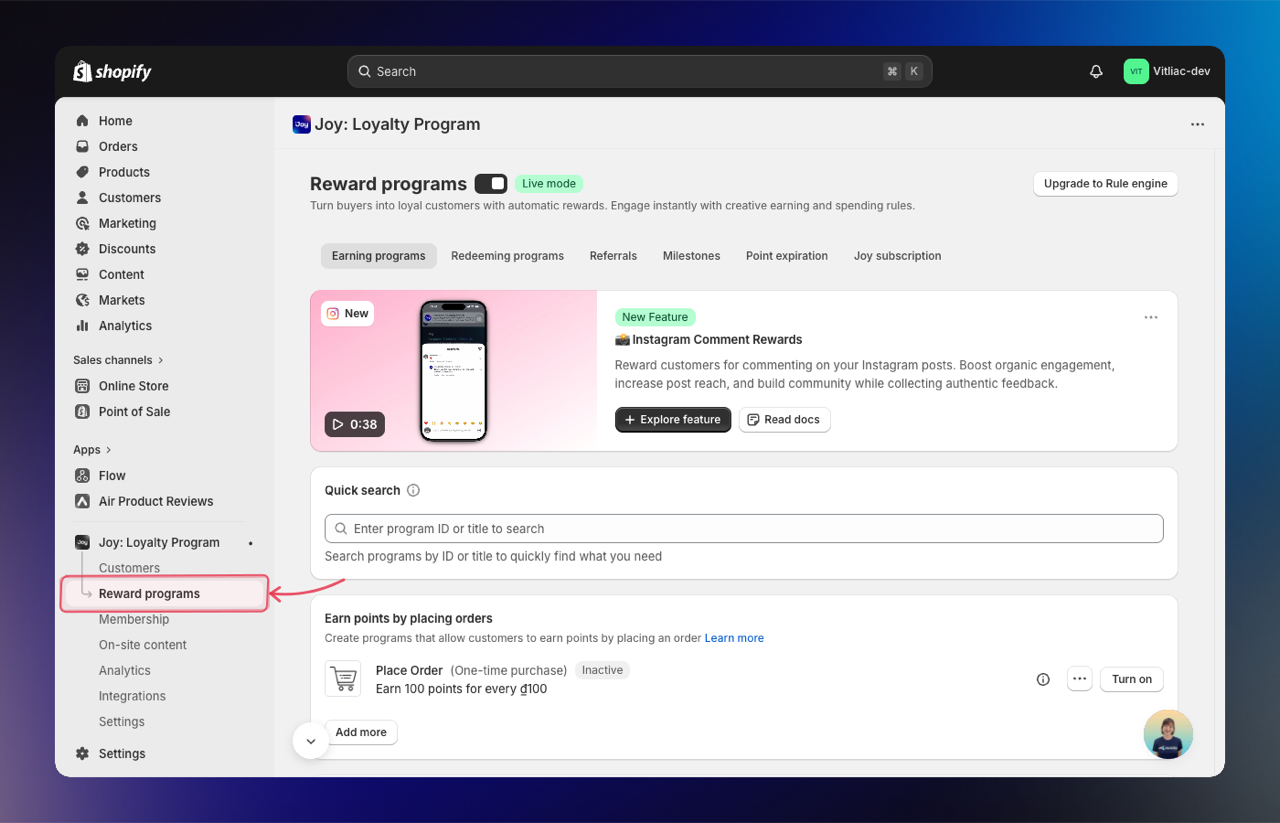
Open the program you want to configure
Go to Reward programs and open or create a program that supports Store Credit: Place Order, Milestones, Referrals, or Shopify Flow.
Select Store Credit as the reward type
In the reward configuration section, choose Store Credit as the reward type. A warning banner will appear at the top of the form indicating that additional permissions are required.
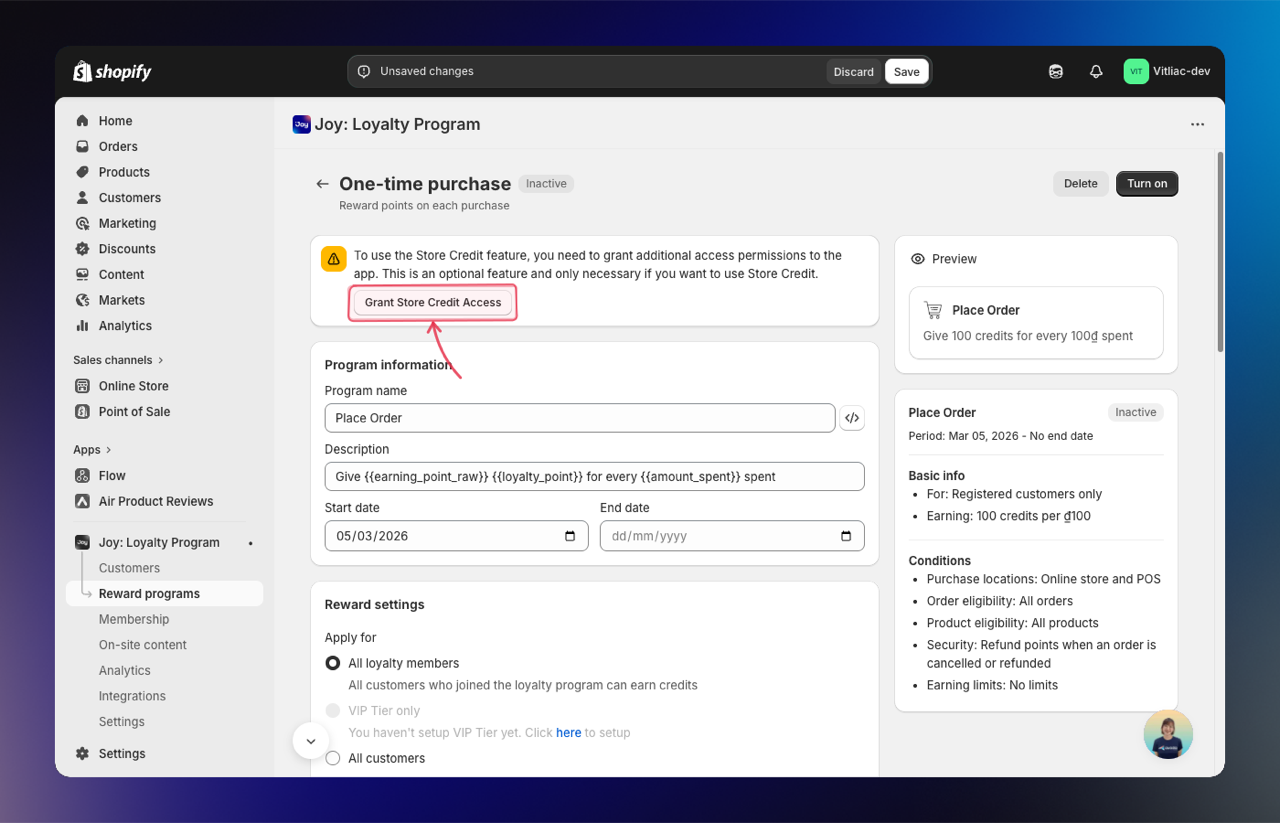
Click "Grant Access"
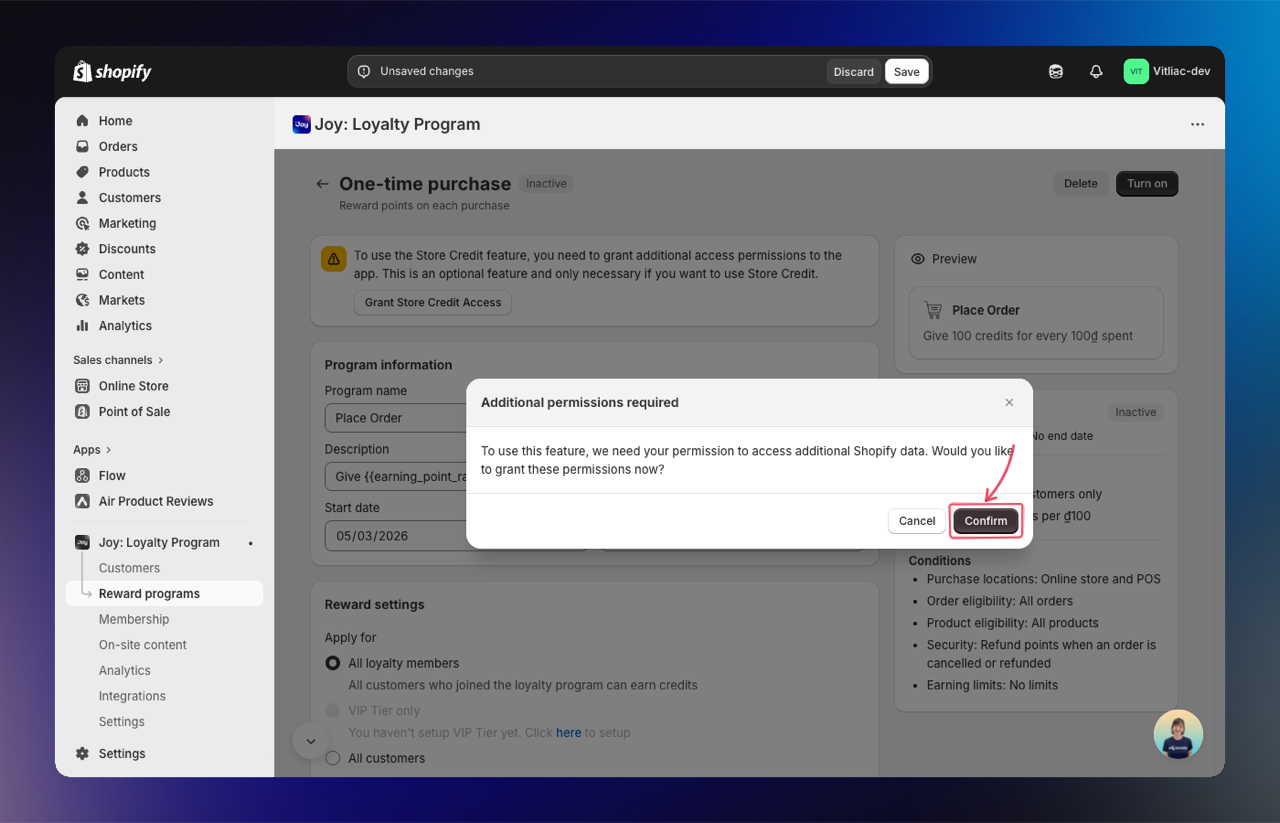
Click the Grant Access button inside the banner. A confirmation popup will appear — click Confirm to authorize Joy Loyalty to manage store credit balances on your customers' Shopify accounts.
Done — the page will reload automatically
Once permissions are granted, the page reloads and Store Credit is fully enabled. The banner will no longer appear in future sessions.
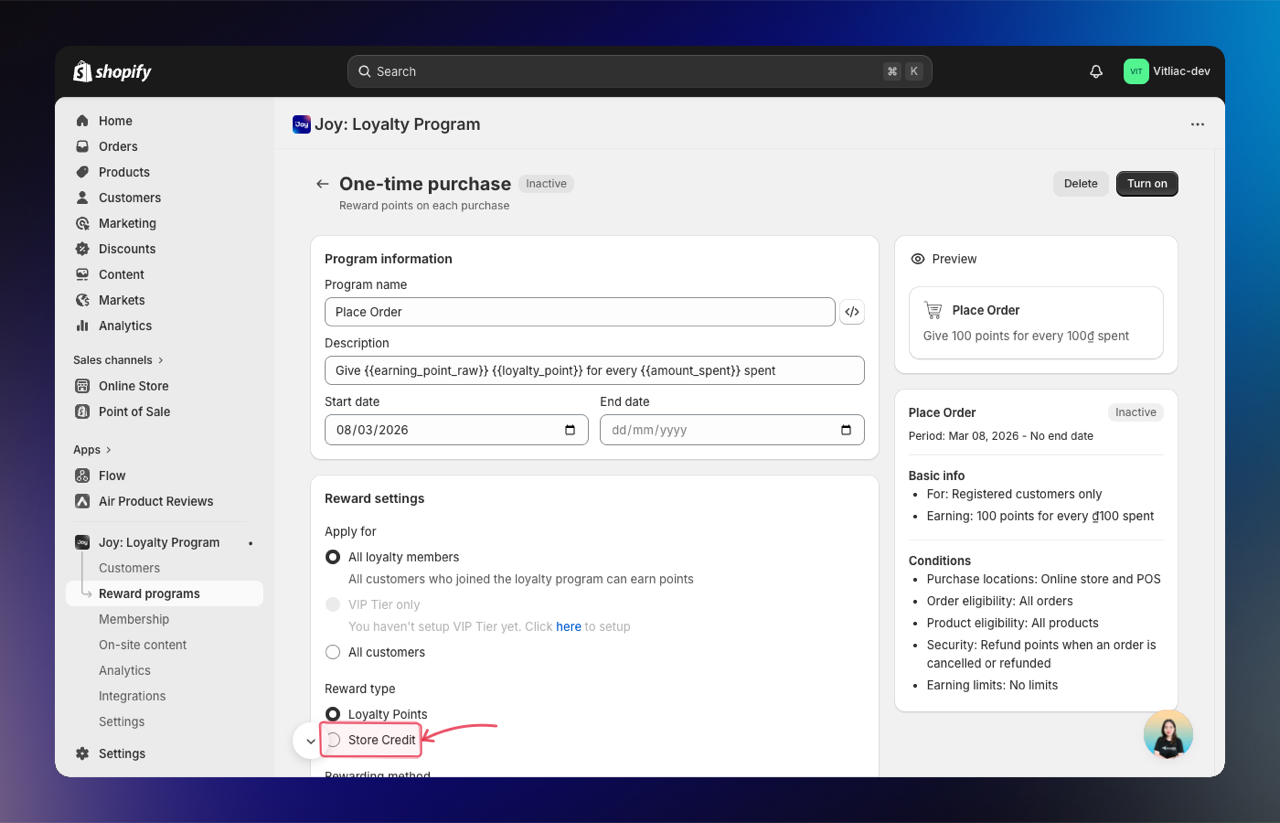
You only need to grant access once — it applies to all programs. If you set up Store Credit in Place Order first, the permission is already in place when you configure Referrals or Milestones.
Where can you use Store Credit?
Store credit is available as a reward type across multiple Joy Loyalty programs:
1. Earning Programs — Place Order
Reward customers with store credit every time they place an order. You can configure the earning rate (e.g., $1 credit per $20 spent).
👉 Learn more about Place Order rewards
2. Milestones
Award store credit when customers reach specific milestones — such as a certain number of orders, total amount spent, or earned points threshold.
| Milestone type | Example |
|---|---|
| Number of orders | $10 credit after 5th order |
| Amount spent | $15 credit after spending $500 |
| Earned points | $5 credit after earning 1,000 points |
| Number of reviews | $3 credit after posting 3 reviews |
| Inactivity | $5 credit for customers inactive for 3 months |
3. Referrals
Reward referrers with store credit when their referred friends complete a purchase. Two store credit options are available:
| Reward option | How it works |
|---|---|
| Store Credit (Fixed) | Referrer earns a fixed store credit amount per successful referral (e.g., $5 per referral) |
| Store Credit (Order-based) | Referrer earns store credit as a percentage of the referee's first order value (e.g., 10% of $100 = $10 credit) |
The Order-based option is especially powerful because it scales the reward with the value the referred customer brings — creating a fairer and more motivating incentive for referrers.
How the Order-based calculation works:
Store credit = Referee's first order value × Reward rate (%)
Example: If the reward rate is 10% and the referee's first order is $100, the referrer earns $10 in store credit.
4. Shopify Flow
You can also grant store credit through Shopify Flow automations for custom scenarios — such as rewarding customers who leave a review via a third-party app, or granting credit based on custom triggers.
👉 Learn more about Shopify Flow + Store Credit
Set store credit to expire
By default, the store credit you award never expires. To make it expire after a set time, Joy gives you two levels of control: a global default that every store credit program inherits, and a per-program override that always wins over the global.
Expiration only applies to store credit granted after you turn it on — existing balances are never affected. Shopify Flow keeps its own separate expiration setting.
Global default — go to Reward programs → Point Expiration, turn on Store credit expiration, and set a duration (e.g. 6 months). All store credit programs use this by default.
Per-program override — each program that rewards store credit (Place Order, Referral, Milestone) has its own Store credit expires after toggle. It always beats the global default:
- On → uses that program's own duration
- Off → that credit never expires
- Untouched → inherits the global default
Customers can see the expiration date on their store credit in their activity history.
How customers see and use Store Credit
Once store credit is added to a customer's account, it's both visible across your storefront and spendable at checkout.
Spending at checkout:
- The balance appears in the customer's Shopify account
- At checkout, the store credit balance is shown as an available payment method
- Customers can apply their store credit to reduce the order total — no coupon code required
- Any remaining balance carries over to future purchases
Seeing the balance on your storefront:
Once your store has Store Credit active, the credit balance — and how much customers will earn — appears on every surface that already shows points. No extra setup and no separate toggle.
"Store Credit active" means you've granted Store Credit permissions and have at least one active program rewarding Store Credit. When both are true, the credit row shows for logged-in customers — even when the balance is $0.00 — exactly like points.
| Surface | What customers see |
|---|---|
| Loyalty widget | A store credit row under their points balance in the Your balance panel. Guests see a sign-up prompt that mentions store credit. |
| Loyalty page | Store credit in the Your balance section, plus a 💵 icon next to each Ways to earn program that rewards store credit. |
| Account page | Store credit alongside points in the My loyalty card — on both the legacy theme block and the new Shopify Customer Account UI. |
| Product page | The earning calculator previews store credit a customer will earn on that product — on its own, or next to points when a program rewards both. |
Balances display in your store's currency, formatted to the local decimal style (Shopify store credit doesn't convert between currencies). Guests don't see a balance, but Ways to earn still shows the store credit icon so they know the reward exists. Storefront history for store credit is coming in a later release.
Store Credit across markets and currencies
Store credit always uses your store's presentment currency and is never auto-converted between currencies — customers earn and spend in the currency of the market they shop in, formatted to its local decimal style. Joy honors your Shopify Markets setup across the whole store credit journey:
| Area | How it behaves across markets |
|---|---|
| Balance and earning display | Shown in the customer's own market currency — no conversion, no odd rounded decimals. |
| Referral rewards by region | Set a different store credit reward per Shopify market, in each region's native currency. Joy matches the referee's region at claim time. Learn more |
| Multi-market referral links | Each customer's referral link opens their own Shopify market — the right subfolder/domain, language, and currency. |
| Place Order earning rates | Set per-currency earning rates (e.g. $1 USD, €2 EUR); Joy applies the right one automatically by the customer's presentment currency. Learn more |
Region-based referral rewards and multi-market referral links require Shopify Markets to be set up in your Shopify admin.
Manage Store Credit balances in Joy
You don't need to switch to the Shopify admin to check or adjust balances — Joy now surfaces store credit directly inside the Customers area.
View a customer's balance
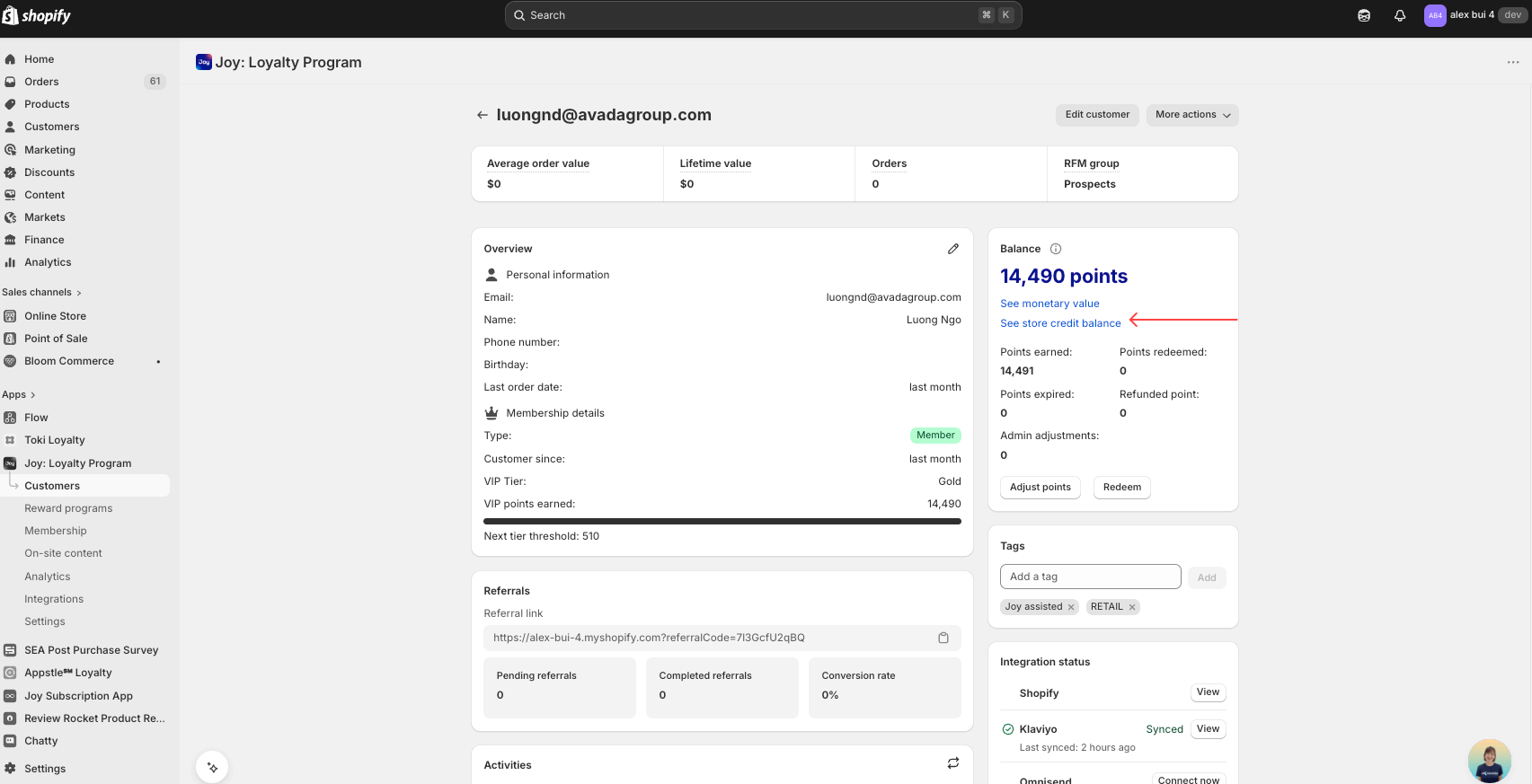
Go to Customers and open any customer to see the Customer detail page.
In the Point balance card, click See store credit balance to switch the card to credits view.
Scroll down to the Activity log to see every credit change over time, including:
- Earned or refunded through Place Order rewards
- Manually adjusted
- Imported
- Used in an order (when the customer spends credit at checkout)
Activity entries use the same format as points — just with currency instead of point units — so your team can scan the history without relearning anything.
Import or adjust credits in bulk
Use this when you want to seed balances from another system, run a one-off campaign adjustment, or correct credits in bulk.
Open the Import dialog
Go to Customers → click Import → choose Adjust store credits to existing customer balances.
Prepare your CSV file
Download the template from the dialog. Each row must include at least one identifier:
- Phone
- Customer ID
When a row contains more than one identifier, Joy uses this priority order: Customer ID → Email → Phone. Email matching is case-sensitive, so double-check for exact matches.
The credit column supports both positive and negative values — use a negative number to reduce a customer's balance (for example, -100 to deduct $100).
Upload and confirm
Upload the CSV and confirm the import. Joy validates the file first, then applies the adjustments. Every change is recorded in the customer's Activity log.
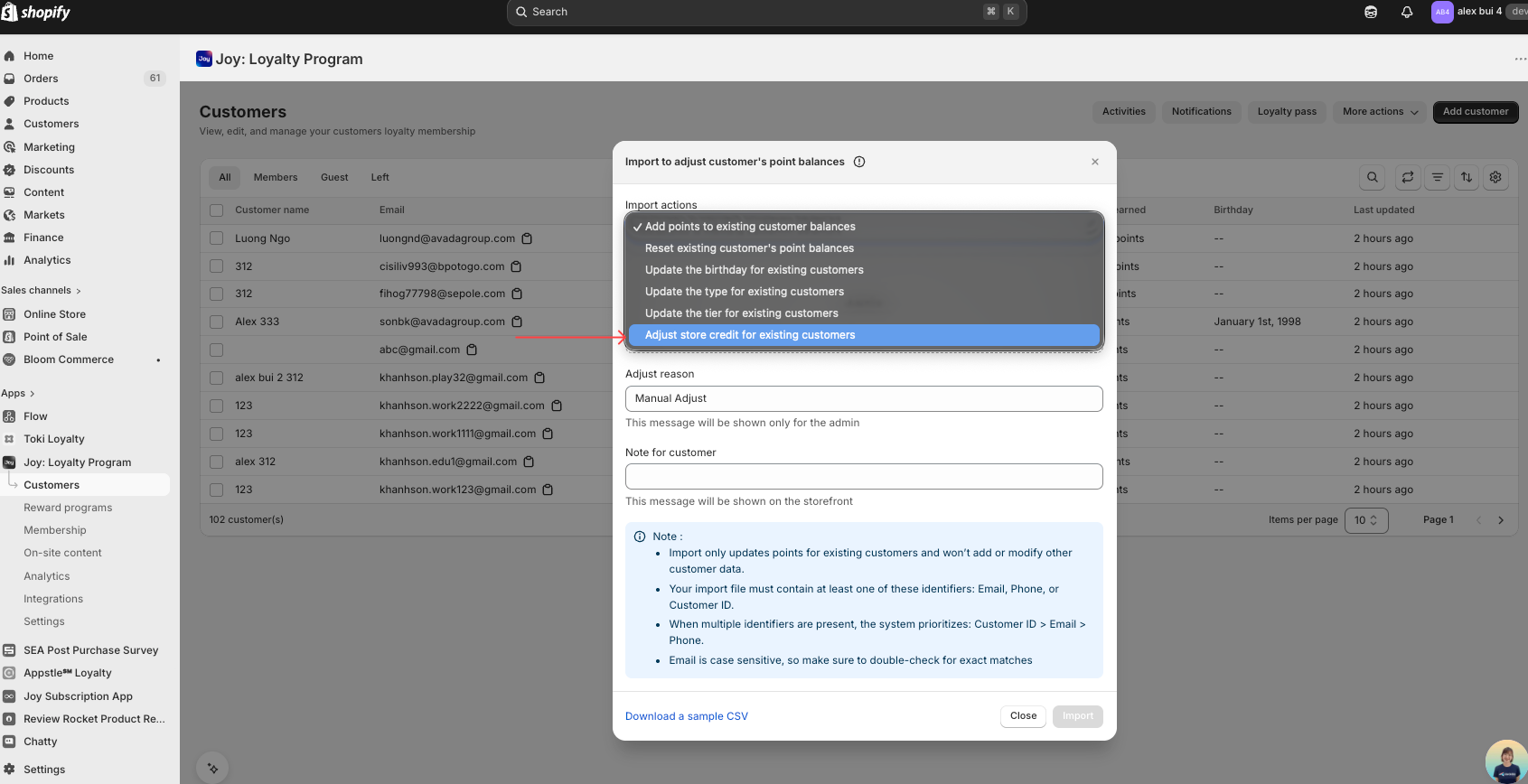
Import only updates credits for customers who already exist in your store. It does not create new customers and does not modify any other customer data (name, address, tags, etc.).
Frequently Asked Questions
Can I use both Points and Store Credit in the same program?
No. Each program is configured with one reward type — either Points or Store Credit. However, you can have different programs using different reward types (e.g., Place Order earns points, Referrals earn store credit).
Does Store Credit work with VIP Tiers?
Yes. If you have VIP tiers with tier-based reward rates, the store credit earning rates will adjust based on the customer's tier level.
Is Store Credit the same as a discount code?
No. Store credit is added to the customer's Shopify account balance and applied at checkout as a payment method. It does not generate a discount code.
Can I manually adjust a customer's store credit?
Yes. You can adjust balances directly from Joy — either one customer at a time in the Customer detail page, or in bulk using the Import action in the Customers list. Every change is recorded in the Activity log. Adjustments stay in sync with Shopify's native store credit system.
What happens to store credit when an order is refunded?
When an order paid with store credit is refunded, the store credit that was used is returned to the customer's balance. Refunds also account for tax and shipping correctly, and every change appears in the customer's Activity log.