Joy and Omnisend
Integrate Joy Loyalty with Omnisend to enhance your email marketing by leveraging loyalty program data
Who can connect Joy with Omnisend?
- This feature is available for All plans.
What is this feature
The Omnisend integration for Joy Loyalty allows you to synchronize your loyalty program data with your email marketing platform, enabling more targeted and effective communications. This integration has been enhanced with real-time event triggers that automatically send detailed loyalty event data to Omnisend when specific loyalty activities occur.
The integration works on two levels:
- Basic data synchronization: Customer loyalty information, like points balance, tier status, and referral links, is made available in Omnisend for segmentation and personalization.
- Enhanced event triggers: Real-time loyalty events are transmitted to Omnisend, allowing you to create automated email workflows based on specific loyalty activities.
Why do you need to integrate Omnisend with Joy Loyalty Program?
Omnisend is a powerful email and SMS marketing automation tool designed for eCommerce businesses, including those on Shopify. When integrated with Joy Loyalty, this partnership empowers merchants to enhance their marketing strategies by leveraging loyalty program data to drive engagement and increase customer retention.
This collaboration helps you:
- Streamline marketing: Use real-time loyalty data to inform and automate email and SMS campaigns
- Personalize customer engagement: Enhance communications by tailoring messages based on loyalty insights
- Improve customer retention: Keep customers coming back by consistently highlighting rewards and program benefits
- Save time: Simplify marketing efforts with automated workflows triggered by loyalty activities
- Create targeted campaigns: Segment customers based on their loyalty tier or points balance for exclusive offers
- Drive program engagement: Automatically remind customers about expiring points or available rewards
With event triggers, your email marketing transitions from periodic campaigns to an ongoing conversation that responds directly to customer interactions with your loyalty program.
Understanding the Rule
The integration between Joy Loyalty and Omnisend allows seamless data synchronization, enabling merchants to include loyalty program details in their marketing efforts. Here's how it works:
- Data Flow:
- Omnisend pulls essential loyalty program data from Joy Loyalty, such as points balance, membership status, VIP tiers, referral links, and birthdays.
- This information becomes accessible for segmentation and personalization in Omnisend.
- Use Cases:
- Create automated workflows to reward loyal customers or re-engage inactive ones.
- Segment customers based on their loyalty tier or point balance for exclusive offers.
By integrating these tools, merchants can craft highly targeted campaigns that resonate with their audience while fostering loyalty and driving sales.
Data Synced by Joy Loyalty
Once integrated, Joy Loyalty provides the following data to Omnisend:
- Loyalty Points Balance: Personalize communications based on customer point levels.
- Membership Status: Segment campaigns by program participation (active/inactive).
- Referral Link: Encourage referrals with customer-specific referral links.
- VIP Tier: Target VIP members with exclusive offers and communications.
- Birthday Details: Automate birthday rewards and celebration campaigns.
Available trigger events
The following events can be used to trigger automations in Omnisend:
Points-related triggers
| Name | Trigger explanation |
|---|---|
| Joy: Earn Point | Triggered when a customer earns points |
| Joy: Points Eligible Reward | Triggered when a customer has enough points to redeem a reward |
| Joy: Redeem Points | Triggered when a customer redeems points |
| Joy: POS Point Redemption | Triggered when a customer redeems points at Point of Sale |
Tier-related triggers
| Name | Trigger explanation |
|---|---|
| Joy: Tier Achieved | Triggered when a customer achieves a new tier |
| Joy: Tier Downgrade | Triggered when a customer tier is downgraded |
| Joy: Tier Reset | Triggered when a customer tier is reset |
| Joy: 4 Weeks Pre Tier Reset | Triggered 4 weeks before customer tier reset |
| Joy: 2 Weeks Pre Tier Reset | Triggered 2 weeks before customer tier reset |
| Joy: 1 Day Pre Tier Reset | Triggered 1 day before customer tier reset |
Birthday-related triggers
| Name | Trigger explanation |
|---|---|
| Joy: Birthday | Triggered on a customer's birthday |
| Joy: 7 Days Pre Birthday | Triggered 7 days before a customer's birthday |
Point expiration triggers
| Name | Trigger explanation |
|---|---|
| Joy: 30 Days Pre Point Expiration | Triggered 30 days before customer points expire |
| Joy: 7 Days Pre Point Expiration | Triggered 7 days before customer points expire |
| Joy: 3 Days Pre Point Expiration | Triggered 3 days before customer points expire |
Referral-related triggers
| Name | Trigger explanation |
|---|---|
| Joy: Coupon Referrers | Triggered when a referrer receives a coupon reward |
| Joy: Point Referrers | Triggered when a referrer receives points as a reward |
| Joy: Referral Friend | Triggered when a referred friend makes their first purchase |
How to integrate Omnisend with Joy Loyalty Program
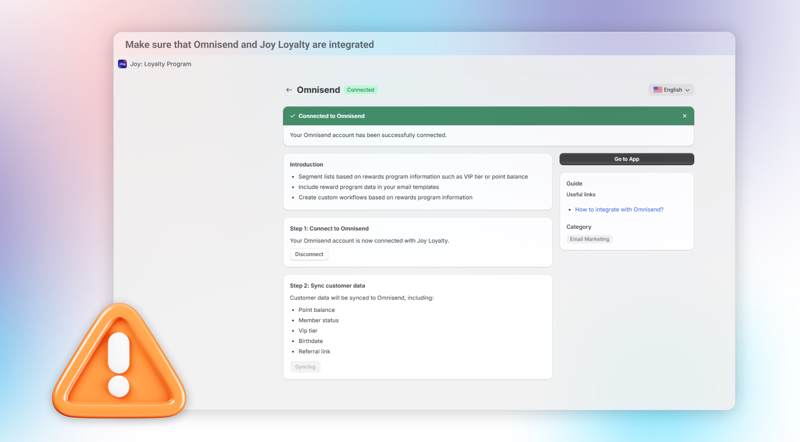
Open the Joy Loyalty dashboard and navigate to the Integrations section.
- Select Omnisend from the list and click Connect.
Authorize Omnisend Access
- Sign in to your Omnisend account and authorize access by clicking Authorize access.
Sync Loyalty Data
- Once connected, check the integration status. If it shows Connected, data will sync automatically.
- If not, click the Sync button to manually sync loyalty data from Joy Loyalty to Omnisend.
What can you do after integrating with Omnisend?
After successfully integrating Joy Loyalty with Omnisend and sending loyalty information to Omnisend, we will now introduce and guide you through the use cases provided by Joy when creating emails using the content below.
Note: To perform the following actions, ensure that Joy Loyalty and Omnisend are integrated, and the loyalty program has been successfully synced with Omnisend.
Segment customers based on their loyalty tier or point balance
The essence of segmenting customers using loyalty criteria: Segmenting customers with loyalty criteria means classifying customers based on loyalty conditions. For example, you can categorize customers by tier, such as segmenting Gold tier customers to send emails exclusively to this group.
To segment customers using loyalty criteria, select "Create Filter" and apply Joy Loyalty criteria. For instance, the example below demonstrates segmenting all Gold tier customers under the VIP tier.
Create automated workflows
The essence of creating automated workflows: Create workflows that include loyalty program information in your email content. For example, you can send emails notifying customers about their points balance, sharing referral links, or tier details directly within the email.
Building workflows with loyalty program details is simple—just use variables and integrate them into your email content appropriately. For instance, the example below demonstrates creating a workflow: When a customer places a new order -> An "Order Confirmation" email is automatically sent to confirm the order and inform the customer of their updated points balance.
- JOY_POINT: The loyalty points earned by customers
- JOY_RL: The referral link customers can share
- JOY_TIER: The customer's loyalty rank or tier level
- JOY_TYPE: The member status in the loyalty program
Creating event-based automations in Omnisend
Once you've configured your triggers in Joy Loyalty, you can set up corresponding automations in Omnisend:
Log in to your Omnisend account
Navigate to Automation > Create Workflow
Select Custom Event as the trigger type
In the dropdown, you'll see all the Joy Loyalty events you've enabled
Select the specific event you want to use as a trigger
Design your email workflow using Omnisend's editor
Utilize event data in your email content to personalize messages
Set the workflow to active when ready
Example automation workflows
Here are powerful automation workflows you can create with the Joy Loyalty triggers:
Points redemption reminder
Trigger: Joy: Points Eligible Reward
Purpose: Alert customers when they have enough points for rewards
Content: Show available rewards and provide a clear redemption path
Benefit: Increases redemption rates and program engagement
Tier advancement celebration
Trigger: Joy: Tier Achieved
Purpose: Congratulate customers on reaching a new tier
Content: Highlight new tier benefits and exclusive offers
Benefit: Reinforces the value of loyalty program progression
Tier retention reminder
Trigger: Joy: 4 Weeks Pre Tier Reset
Purpose: Notify customers who are at risk of losing their current tier
Content: Show current status, requirements to maintain tier, and benefits of keeping status
Benefit: Motivates additional purchases to maintain tier status
Point expiration warning series
Triggers: Joy: 30 Days Pre Point Expiration → Joy: 7 Days Pre Point Expiration → Joy: 3 Days Pre Point Expiration
Purpose: Create a sequence of increasingly urgent reminders about expiring points
Content: Show expiring points amount and suggest redemption options
Benefit: Reduces point wastage and drives redemption activity
Birthday campaign sequence
Triggers: Joy: 7 Days Pre Birthday → Joy: Birthday
Purpose: Build anticipation for birthday rewards and then deliver them
Content: Teaser message followed by birthday reward details
Benefit: Creates a memorable loyalty moment and strengthens emotional connection
Referral thank you
Trigger: Joy: Point Referrers
Purpose: Thank customers who have successfully referred friends
Content: Show points earned and encourage additional referrals
Benefit: Reinforces referral behavior and acknowledges customer advocacy
Frequently Asked Questions
Q: Which loyalty events can trigger Omnisend automations?
A: Joy Loyalty sends many events to trigger automations including point earnings, redemptions, tier changes, upcoming tier resets, birthdays, point expirations, and referral activities. The full list can be viewed and configured in your Joy Loyalty integration settings.
Q: Do I need to set up the triggers in both Joy Loyalty and Omnisend?
A: Yes. You need to enable the triggers you want in the Joy Loyalty integration settings, then create corresponding automation workflows in Omnisend that use these triggers as starting points.
Q: How do I access loyalty data in Omnisend email templates?
A: You can use variables such as {{ event.pointsBalance }}, {{ event.tierName }}, and others depending on the trigger event. These variables are available in the Omnisend email editor.
Q: How quickly are loyalty events sent to Omnisend?
A: Events are transmitted to Omnisend in real-time as they occur in your loyalty program, allowing for immediate email communications.
Q: How do I troubleshoot if an expected email isn't being triggered?
A: First verify the trigger is enabled in Joy Loyalty, then check that the corresponding workflow is active in Omnisend. Also confirm the test customer has a valid email address and hasn't unsubscribed from marketing emails.
Overall
Integrating Joy Loyalty with Omnisend gives merchants a competitive edge by combining loyalty data with powerful marketing automation. This collaboration ensures your customers feel valued, fostering stronger relationships and boosting retention. Set up the integration today to elevate your marketing strategy!